LIS Portal Login Philippines 2026: Complete Learner Information System Guide
Important: This is an unofficial guide. This website is not affiliated with, endorsed by, or connected to the Department of Education (DepEd). To use the official Learner Information System, please go through the official DepEd LIS portal.
Visit the Official DepEd LIS Portal
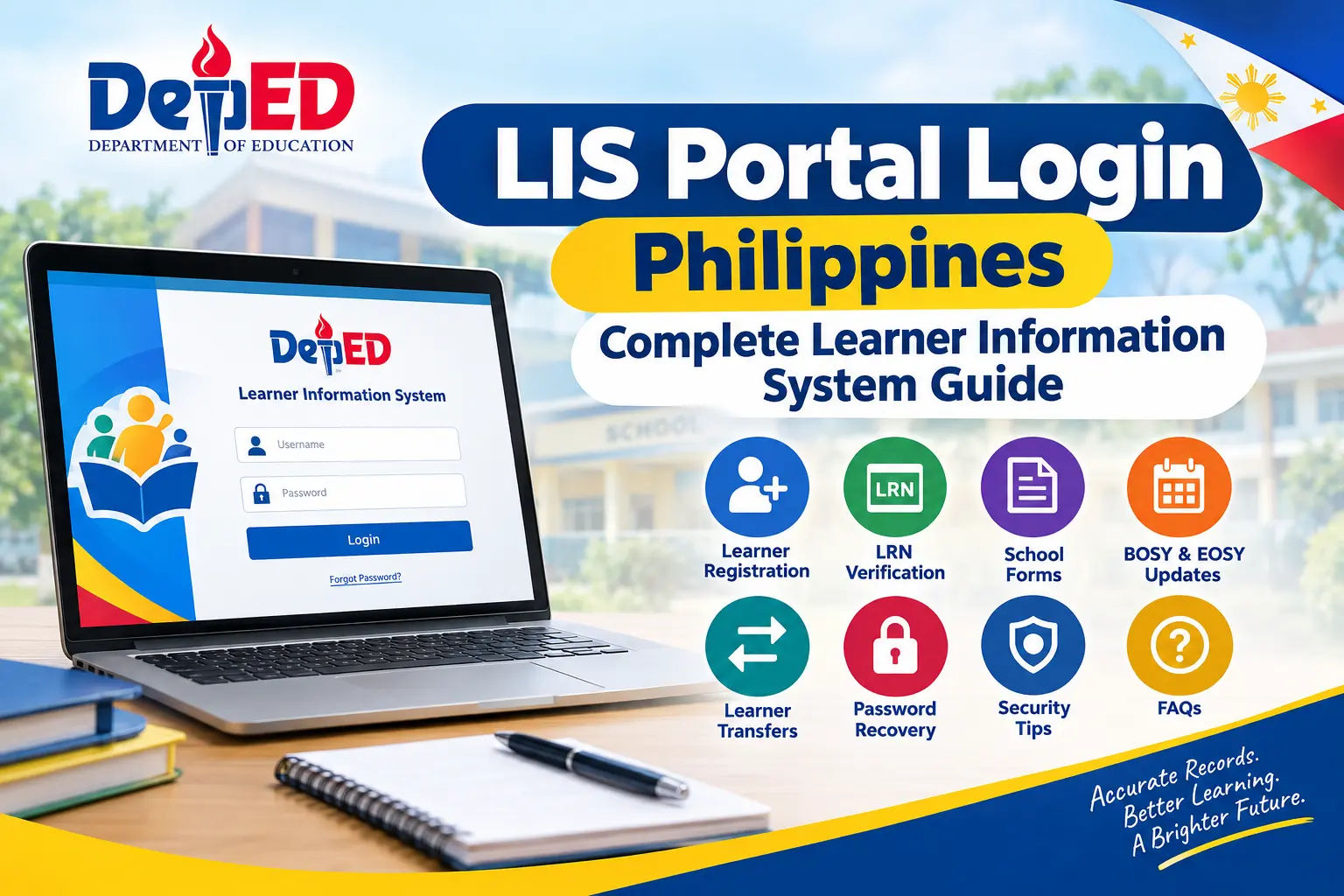
The LIS Portal Login Philippines 2026 guide helps authorized school personnel understand how to access and use the DepEd Learner Information System (LIS). Managed by the Department of Education (DepEd), the LIS Portal is an online platform designed to maintain and update learner records across Philippine basic education, from Kindergarten to Senior High School. It supports essential school activities, including learner registration, enrollment record management, Learner Reference Number (LRN) verification, student transfers, and the preparation of official school forms.
The DepEd LIS Portal is primarily used by school heads, class advisers, registrars, and authorized administrative personnel who handle learner information and school reporting requirements. It also supports important school-year activities, such as Beginning of School Year (BOSY), End of School Year (EOSY), learner tagging, and enrollment monitoring. In this complete guide, you will learn about LIS Portal login, its main features, learner record management, common access issues, and essential steps for using the system efficiently while maintaining accurate student information.
Understanding the LIS Portal
The LIS Portal Philippines 2026 is the Department of Education (DepEd) online system used to manage and maintain learner information across the Philippine basic education system. The Learner Information System (LIS) helps authorized school personnel register learners, update enrollment details, verify student records, and maintain accurate academic information. It supports both public and private schools, subject to applicable DepEd policies and system access.
A key feature of the DepEd LIS Portal is the Learner Reference Number (LRN), a unique 12-digit identifier assigned to each learner. The LRN helps maintain continuity of student records when learners progress to another grade level or transfer to a different school. By keeping learner information organised in a centralised system, the LIS helps schools reduce duplicate records, improve data accuracy, and complete essential administrative and reporting tasks more efficiently.
What Is the Learner Information System?
The Learner Information System (LIS) is a centralised database designed to support the management of learner records throughout the Philippine basic education system. Instead of creating an entirely new learner identity every school year, the system uses the learner’s existing record and LRN to help authorised personnel update enrollment information and track educational progress.
The LIS Portal supports learner record management for the following education levels and programmes:
Through the LIS Portal Login Philippines 2026, authorised school personnel can access the functions available to their accounts and carry out relevant record-management tasks. When a learner transfers schools, the existing LRN helps the receiving school maintain continuity of the learner’s educational history, subject to DepEd procedures and access permissions. Homepage
Who Can Use the LIS Portal?
The LIS Portal Philippines 2026 is designed for authorised personnel of the Philippine Department of Education (DepEd) who are responsible for managing learner information and school records. Access depends on the user’s assigned role, account status, and permissions. The portal is not intended for unrestricted public access, and students and parents generally obtain learner information through their respective schools or other designated DepEd services.
The following personnel may use the DepEd Learner Information System (LIS), depending on their assigned responsibilities and access rights:
| Authorised User | Primary Responsibilities |
|---|---|
| Class Advisers | Update learner details, manage class lists, and maintain enrollment records. |
| School Heads | Supervise school-level transactions and monitor learner data accuracy. |
| ICT Coordinators | Assist with account access, technical issues, and system support. |
| School Registrars | Maintain learner records and assist with registration and school transfers. |
| Division Planning Officers | Support learner data validation, reporting, and LRN-related requests. |
| Regional Administrators | Monitor regional education data and support reporting activities. |
| DepEd Central Office Personnel | Oversee national-level learner information management and system administration. |
Access to specific functions may vary according to DepEd policies and the permissions assigned to each account. Parents and students should contact their school for assistance with their LRN, enrollment details, or corrections to learner records.
Requirements Before Logging in to the LIS Portal
Before accessing the LIS Portal Login Philippines 2026, prepare your authorised account credentials and ensure that your device has a reliable internet connection. Having these requirements ready can help reduce common login difficulties and make it easier to access the available learner information management features.
Essential LIS Portal Login Requirements
Make sure you have the following:
Recommended Web Browsers
The LIS Portal can generally be accessed through modern web browsers. Consider using one of the following updated options:
An updated browser can improve compatibility, security, and page loading. If the LIS Portal login page fails to load or displays an error, check your internet connection, confirm that you are using the correct official portal address, and verify your account permissions with your school’s designated LIS administrator.
Documents Commonly Used in the LIS Portal
When managing learner records through the LIS Portal Philippines 2026, schools may need supporting documents to verify student identities, confirm enrollment details, and update educational histories. The required documents depend on the learner’s situation and the transaction being processed.
Commonly used documents include:
Preparing accurate documentation helps authorised school personnel maintain reliable records in the DepEd Learner Information System (LIS). Not every transaction requires all these documents, so schools should follow the applicable DepEd guidelines.
How to Log In to the LIS Portal Philippines 2026
Authorised DepEd personnel can access the LIS Portal using the credentials and permissions assigned to their accounts. Follow these general steps to sign in and access the available learner management features.
Step 1: Open the Official LIS Portal
Open Google Chrome, Microsoft Edge, or another updated browser and navigate to the official DepEd system you have been instructed to use.
Important: The link https://beis.deped.gov.ph/ is associated with the Basic Education Information System (BEIS). Do not assume it is the lis gov deped login page. Confirm the correct LIS address through your school administrator or official DepEd instructions.
Step 2: Enter Your DepEd Username
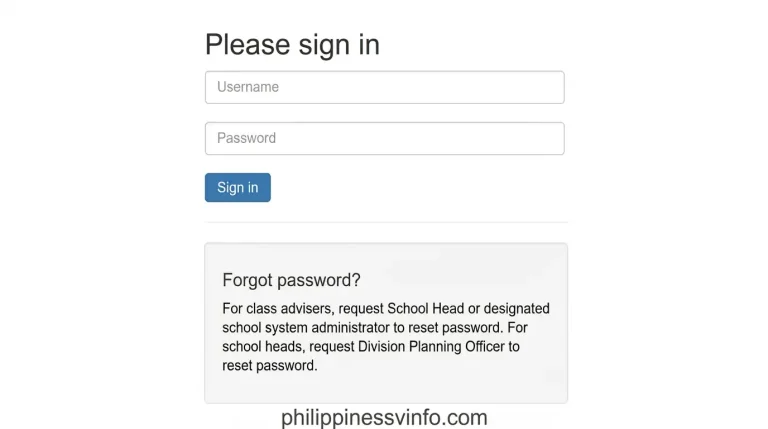
On the login page, enter the username associated with your authorised LIS account.
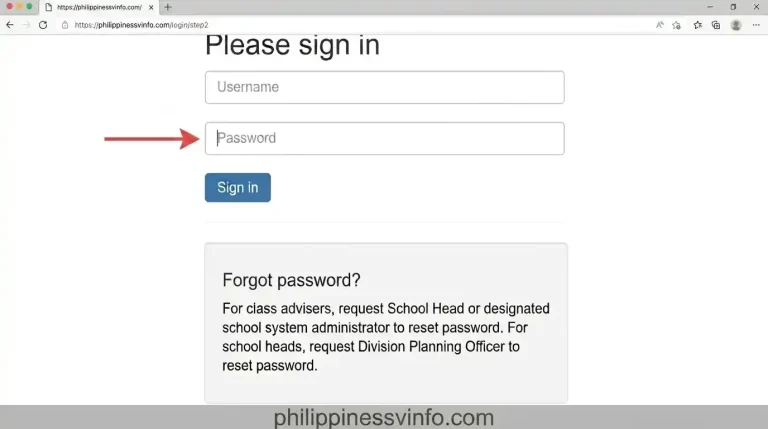
Step 3: Enter Your Password
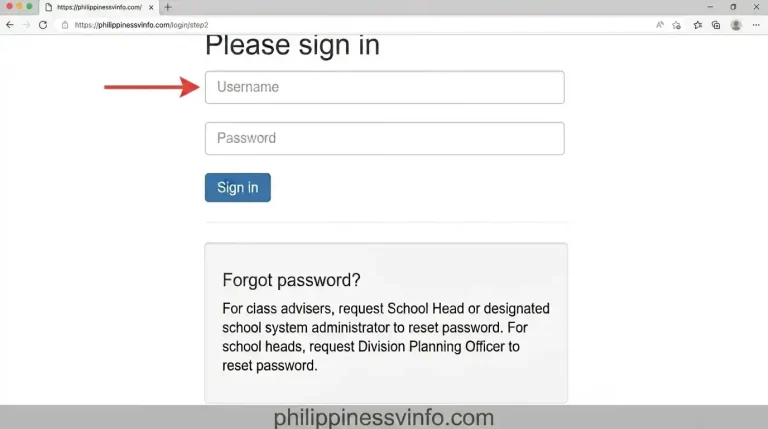
Enter the password associated with your account.
Step 4: Complete Account Verification
If the portal requests additional verification or an account update, follow the instructions displayed on the official page.
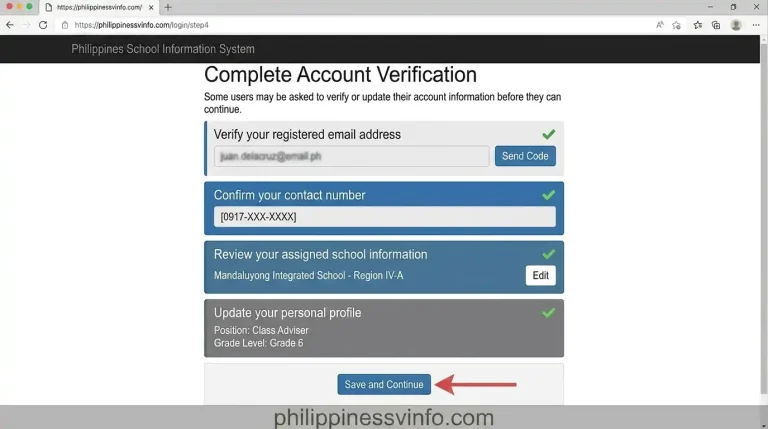
The exact verification process may vary depending on the portal configuration and your account permissions.
Step 5: Access the LIS Portal Dashboard
After successful login, you should be able to access the features permitted for your account. Depending on your role, these may include:
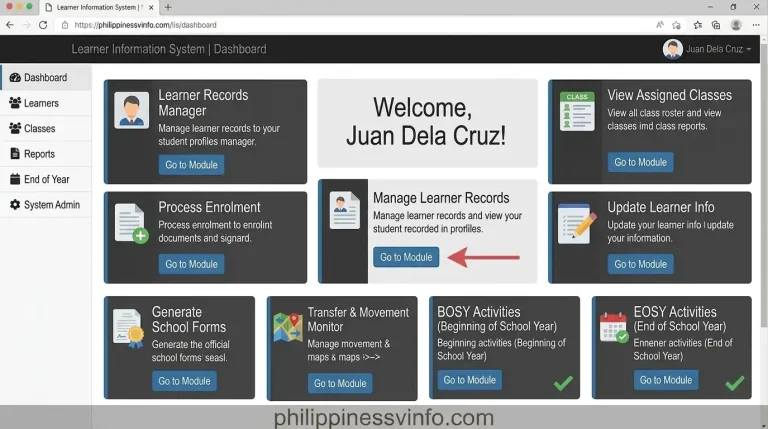
Available features depend on your assigned permissions and the current system configuration. If a function is missing, contact your school’s designated LISlis login deped administrator for assistance.
How to Register a New Learner in the LIS Portal Philippines 2026
Registering a new learner in the LIS Portal Philippines 2026 allows authorised school personnel to create and maintain learner records in the DepEd Learner Information System. Before starting the registration process, schools should verify whether the learner already has a Learner Reference Number (LRN). This is especially important for students transferring from another school, as an existing LRN should be retained rather than creating a duplicate record.
Step 1: Open the Learner Enrollment Section
Log in to the official lis gov deped login Portal using your authorised DepEd account. Navigate to the learner management or enrollment section available to your account.
The exact menu names may vary depending on the system version and your account permissions.
Step 2: Search for an Existing Learner Record
Before creating a new profile, check whether the learner is already registered in the system. An existing record may be available even if the learner is new to your school.
Use the available search fields, which may include:
If a matching record exists, follow the applicable DepEd procedures to retrieve or update it instead of creating another profile.
Step 3: Enter the Learner’s Information
If the learner does not have an existing record and meets the requirements for new registration, enter the requested details in the appropriate fields.
Information may include:
Check the supporting documents and follow current DepEd instructions when completing these fields. Only provide information requested by the official system.
Step 4: Verify the Learner Reference Number (LRN)
After successful registration, follow the system’s instructions to obtain or confirm the learner’s LRN. The Learner Reference Number is a unique 12-digit identifier used to maintain continuity of learner records throughout basic education.
If the learner already has an LRN, use the existing number. Do not attempt to generate a second LRN for the same learner.
Step 5: Save the Record and Complete Enrollment
Review the information carefully before submitting the registration or enrollment transaction.
The options available and the approval process may differ depending on the learner’s circumstances and the current DepEd LIS procedures.
How to Update Student Information in the LIS Portal
Keeping learner records accurate is an important responsibility of authorised school personnel. The DepEd lis gov deped login Portal supports the maintenance of learner information so that school records remain consistent and can be used for enrollment, reporting, and other administrative requirements.
Depending on the user’s permissions and the available system features, learner records may include information such as:
Important Tips Before Saving Changes
Always verify the information against appropriate supporting documents before submitting updates. Some changes may require additional documentation, approval, or assistance from a school or division administrator.
If a field cannot be edited or a record contains conflicting information, contact the designated lis gov deped login administrator rather than creating a duplicate learner profile. These precautions help preserve accurate learner records and reduce errors in future enrollment and reporting activities.
How to Generate DepEd School Forms Through the LIS Portal
The LIS Portal Philippines 2026 helps authorised school personnel manage learner information and prepare school reports required for administrative and reporting purposes. Depending on the system’s available features and the user’s permissions, learner data maintained in the DepEd Learner Information System (LIS) may support the preparation and verification of official DepEd School Forms.
Common DepEd School Forms
| School Form | Purpose |
|---|---|
| SF1 – School Register | Records essential information about learners enrolled in a class. |
| SF2 – Daily Attendance Report | Documents learner attendance and absences. |
| SF4 – Monthly Learner Movement Report | Summarises learner movement and attendance-related information as prescribed. |
| SF5 – Report on Promotion and Learning Progress | Records learner promotion status and learning progress at the end of the school year. |
The availability and preparation process for each form may vary depending on current DepEd procedures and the system being used.
Steps to Prepare School Forms
Follow these general steps to prepare learner reports using the available school information system:
- Sign in using your authorised DepEd account.
- Open the relevant class or learner records section.
- Locate the available reports or school forms feature.
- Select the required form, if available.
- Choose the appropriate school year and class.
- Review learner names, enrollment details, and other required information.
- Generate or prepare the report using the available options.
- Check the completed form before printing, saving, or submitting it.
Important: Not every DepEd School Form is necessarily generated directly through the lis gov deped login Portal. Some forms may require other DepEd systems or approved school reporting procedures. Always follow the latest instructions issued by your school or Schools Division Office.
How to Update EOSY Status in the LIS Portal
The End of School Year (EOSY) process is an important part of learner record management in the Philippine education system. It helps schools finalise learner information, record end-of-year outcomes, and prepare the data required for school-level and DepEd reporting.
Authorised class advisers and other designated personnel should review learner records carefully before completing EOSY-related transactions. The available options and approval requirements depend on the applicable DepEd guidelines and the system’s current configuration.
Common Learner Statuses During EOSY
| Learner Status | Meaning |
|---|---|
| Promoted | The learner has met the applicable requirements to advance to the next grade level. |
| Retained | The learner will repeat the current grade level under the applicable promotion rules. |
| Graduated | The learner has completed the relevant educational level or programme. |
| Transferred Out | The learner has moved to another school, subject to the applicable recording procedures. |
| Dropped Out | The learner’s status has been recorded according to the relevant DepEd rules for discontinued schooling. |
| Irregular | May apply in specific circumstances where the learner’s academic progression does not follow the regular grade-level sequence, subject to system definitions. |
These descriptions are general. The exact status labels, definitions, and available options may differ according to the learner’s circumstances and current DepEd instructions.
Steps to Complete EOSY Updates
- Log in to the official LISlis login deped Portal using your authorised account.
- Open the relevant class or EOSY section, if available.
- Select the appropriate school year.
- Review each learner’s enrollment and academic information.
- Verify the learner’s final status against official school records.
- Enter or confirm the applicable status using the available system options.
- Save or submit the information according to the required procedure.
- Review the completed records and resolve any validation errors.
Completing EOSY updates accurately and within the announced deadline helps schools maintain consistent learner records. Before submitting the final data, confirm the current reporting schedule and instructions issued by DepEd or your Schools Division Office.
Learner Tags Available in the LIS Portal
The LISlis login deped Portal Philippines 2026 supports the collection and management of learner information used for school administration, education planning, and reporting. Depending on the current system configuration and applicable DepEd guidelines, learner classifications and programme-related tags may help schools identify students who belong to specific groups or require particular educational support.
Common learner categories and programme-related information may include:
The exact tags available may change according to DepEd policies and system updates. Authorised personnel should select classifications based on verified records and the applicable reporting instructions.
Best Practices for Using the LIS Portal
Following good practices when using the DepEd Learner Information System helps protect learner information, minimise record errors, and improve school reporting accuracy.
Common LIS Portal Login Problems and Their Solutions
Users may occasionally experience login errors, slow loading, or difficulties accessing learner records through the lis gov deped login Portal Login Philippines 2026. Checking account credentials, browser settings, and assigned permissions can help identify the cause.
| Problem | Possible Cause | Recommended Solution |
|---|---|---|
| Invalid Username or Password | Incorrect credentials or a typing error | Check your username and password, including capitalisation and extra spaces. |
| Account Locked or Restricted | Security restrictions or repeated unsuccessful login attempts | Follow the official account recovery procedure or contact your administrator. |
| Dashboard Not Accessible | Missing permissions or an inactive account | Ask your designated LIS administrator to verify your access. |
| Slow Portal Performance | Network problems or heavy system traffic | Check your internet connection and try again later. |
| Browser Compatibility Issues | Outdated browser or corrupted cached data | Update your browser and, if necessary, clear its cache. |
| Unable to Edit Learner Information | Restricted permissions or a record requiring review | Check the displayed message and contact the authorised school or division personnel. |
| Pending Learner Transfer | Incomplete transfer processing or verification | Coordinate with the relevant schools to resolve the pending transaction. |
If the problem continues, record the error message and contact the appropriate school or division administrator. Avoid repeatedly submitting requests when the system is experiencing an issue.
How to Reset Your LIS Portal Password
If you forget your password or cannot sign in to the Learner Information System, use the official password recovery procedure applicable to your account. The available recovery options may differ depending on the current lis gov deped login system and your school’s account management arrangements.
Step 1: Contact Your School Administrator
Contact the designated person responsible for LISlis login deped access at your school. Depending on the local arrangements, this may be your School Head, ICT Coordinator, or another authorised administrator.
Explain the login problem and request assistance with account recovery.
Step 2: Verify Your Account Information
The administrator may need to verify your identity and confirm your account details before helping you regain access.
You may be asked for:
Provide this information only through appropriate official channels. Never disclose your existing password to another person.
Step 3: Set a New Password
If your account administrator or the official recovery process authorises a password reset, follow the instructions provided.
You may be required to create a new password or change a temporary password during your next login.
For better account security:
Step 4: Sign In Again
Return to the verified official LIS login page and enter your username and updated password. If access is still unsuccessful, contact your administrator to check whether the password reset was completed and whether your account remains active.
Important: Do not rely on unverified password-reset links or provide your credentials to third-party websites claiming to offer lis gov deped login account recovery.
LIS Portal Security Tips
The LIS Portal Philippines 2026 supports the management of learner records and school information, making account security an important responsibility for every authorised user. Following recommended cybersecurity practices helps reduce the risk of unauthorised access and protects sensitive learner information maintained through the DepEd Learner Information System.
Best Practices to Keep Your LIS Account Secure
Best Practices for Teachers and School Personnel
Responsible use of the DepEd Learner Information System (LIS) helps schools maintain accurate learner records and complete enrollment and reporting activities more efficiently.
Recommended Practices for LIS Users
These practices support reliable reporting, protect learner privacy, and reduce errors during important school-year activities.
Benefits of Using the LIS Portal Philippines 2026
The Learner Information System helps modernise learner record management by providing a centralised digital platform for authorised school personnel. Compared with relying entirely on paper-based records, the system can make learner information easier to maintain, verify, and use for administrative reporting.
Key benefits include:
Overall, the LISlis login deped Portal Login Philippines 2026 is an important resource for authorised DepEd personnel who manage learner information. Using the system correctly, protecting account credentials, and following official DepEd procedures helps schools maintain dependable records and support effective education administration.
Frequently Asked Questions (FAQs) About the LIS Portal
Final Thoughts
The LIS Portal Login Philippines 2026 is an important resource for managing learner information across the Philippine basic education system. By supporting learner record management, LRN verification, enrollment activities, and school reporting, the DepEd Learner Information System helps authorised personnel maintain consistent and reliable educational records.
Whether you are handling Beginning of School Year (BOSY) enrollment, completing End of School Year (EOSY) updates, reviewing learner information, or preparing school reports, following the correct procedures is essential. Always verify the official LIS login address, protect your account credentials, and follow the latest DepEd guidelines to maintain accurate records and safeguard learner information.
Read more
- Child Birth Registration in the Philippines 2026
- PNP Payslip Online 2026: Complete Step-by-Step Guide to Check and Download Your Payslip
- PNP Payslip Online Login 2026: How to Check and Download Your Payslip
- One STI Student Portal Philippines 2026-2027: Complete Login, Grades, Schedule & Student Guide
- NBI Online Appointment & Clearance Renewal Guide 2026