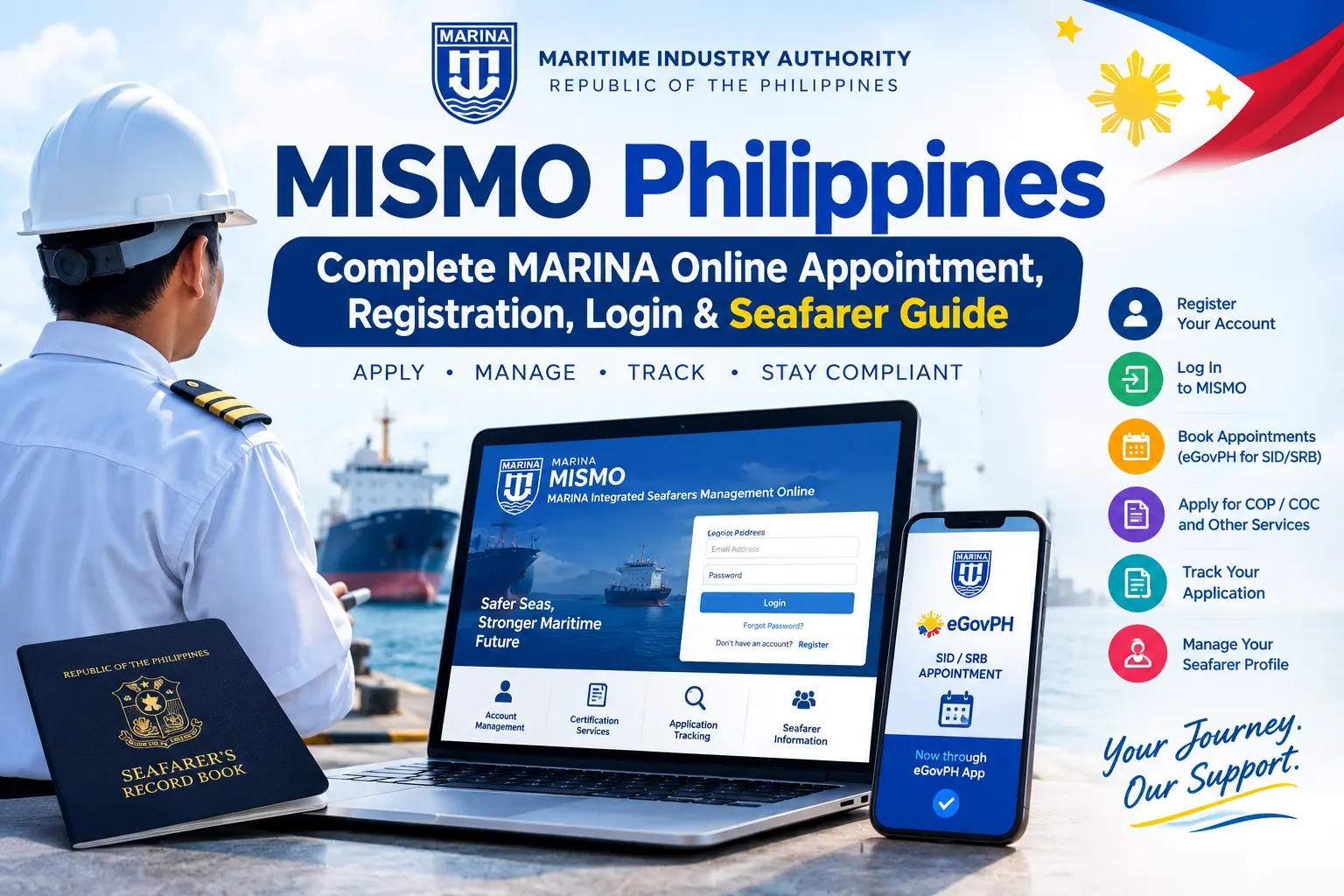
MISMO Philippines 2026–2027: Complete MARINA Online Appointment, Registration, Login & Seafarer Guide
The MISMO Philippines (MARINA Integrated Seafarers Management Online) system is an online platform that helps Filipino seafarers access applicable services provided by the Maritime Industry Authority (MARINA). Through the system, eligible users can manage their accounts, access relevant seafarer services, and complete available certification-related transactions. Understanding the registration and login process can help seafarers prepare their information correctly and avoid unnecessary delays when accessing online services.
This guide explains how to access the MISMO portal, register an account, log in, and navigate available MARINA services for 2026–2027. It also covers important appointment information for Seafarer’s Record Book (SRB) and Seafarer’s Identity Document (SID) applications. According to the information provided, new SRB and SID appointments are handled through the eGovPH App, while previously scheduled appointments remain valid. Before proceeding, verify the latest instructions through official MARINA channels, use the appropriate government platform for your transaction, and avoid unofficial websites or agents promising guaranteed appointments.
What Is MISMO Philippines?
The MISMO Philippines 2026–2027 platform stands for MARINA Integrated Seafarers Management Online. It is an online system operated by the Maritime Industry Authority (MARINA) to support seafarer account management and access to available maritime certification services. Instead of handling every requirement manually, registered seafarers can use the portal to enter their personal information, manage account details, and access the transactions made available to them.
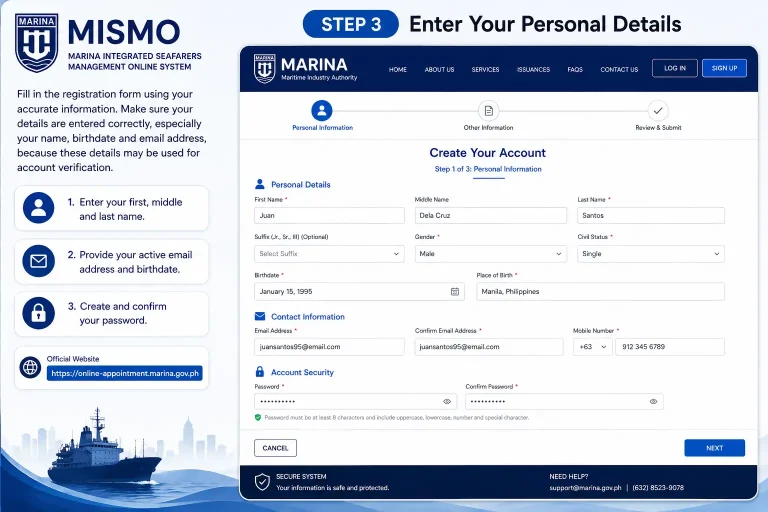
The MISMO registration page requests basic information, including your first name, middle name (if applicable), last name, email address, date of birth, password, and password confirmation. Applicants must also agree to the system’s Terms and Conditions before completing registration. Depending on the service and eligibility requirements, the platform may support transactions related to Standards of Training, Certification and Watchkeeping (STCW), Certificates of Proficiency (COP), Certificates of Competency (COC), and other applicable certification processes. Always check the current instructions on the official MARINA website before submitting an application.
Services Available Through MISMO
Depending on your account and the specific transaction, the system may provide access to:
Important appointment update: MISMO account access and MARINA appointment booking are not necessarily the same process. For Seafarer’s Record Book (SRB) and Seafarer’s Identity Document (SID) appointments, check the latest official MARINA instructions for the eGovPH App procedure. Use the government’s official platforms and avoid unofficial websites that promise guaranteed appointment slots.
MISMO and eGovPH: What Changed in 2026?
Many Filipino seafarers are unsure whether they should use MISMO or the MARINA Online Appointment System (OAS) for their transactions. The key difference is that MISMO supports seafarer account management and applicable certification services, while certain appointment processes now use the eGovPH App. According to MARINA Advisory No. 2026-24, effective 13 May 2026, new appointments for the issuance, renewal, and replacement of the Seafarer’s Identity Document (SID) and Seafarer’s Record Book (SRB) are processed exclusively through the eGovPH App. Appointments confirmed before that date remain valid and do not need to be booked again solely because of the change.
To schedule a new SID or SRB appointment, applicants should create and verify their eGovPH account, locate the relevant MARINA service, provide the required details, choose an available appointment date and venue, and follow the instructions for confirmation and payment, where applicable. Always check the latest official announcements before starting, as procedures may differ depending on the service you need. Homepage
MISMO Registration Requirements
Before creating a new MISMO account, prepare the information requested on the registration page. Entering accurate details can help reduce errors during account verification and ensure your information matches your records.
You will generally need:
How to Register for a MISMO Account
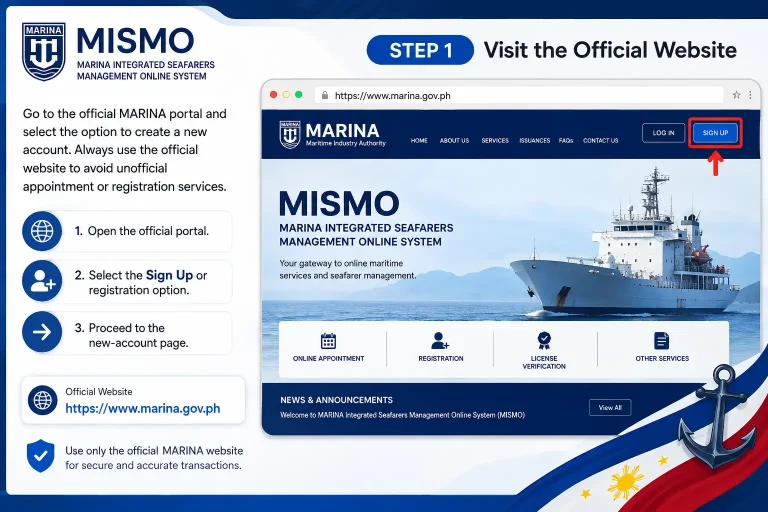
Step 1: Visit the Official MARINA Portal
Open the official MARINA website and navigate to the MISMO system or its registration page. Make sure you are using an official government website before entering personal information.
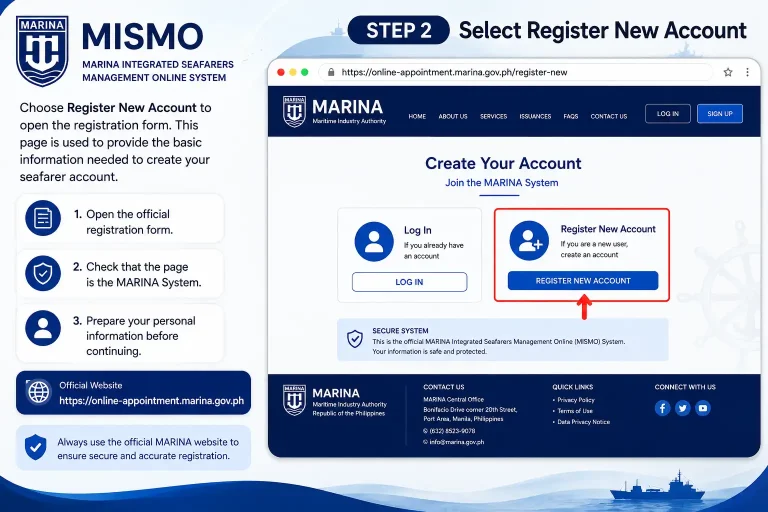
Step 2: Select Register New Account
Choose the Register New Account option to open the account creation form. Before continuing, confirm that you are on the correct registration page.
Step 3: Enter Your Personal Details
Complete the registration form using accurate and up-to-date information. Check your spelling carefully, especially your name, birthdate, and email address.
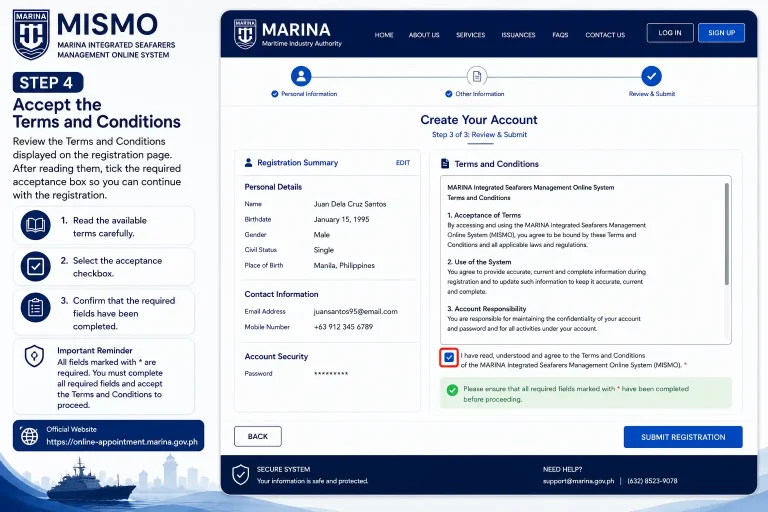
Step 4: Accept the Terms and Conditions
Read the Terms and Conditions displayed on the registration page before proceeding. You must accept the required terms to continue if the form makes acceptance mandatory.
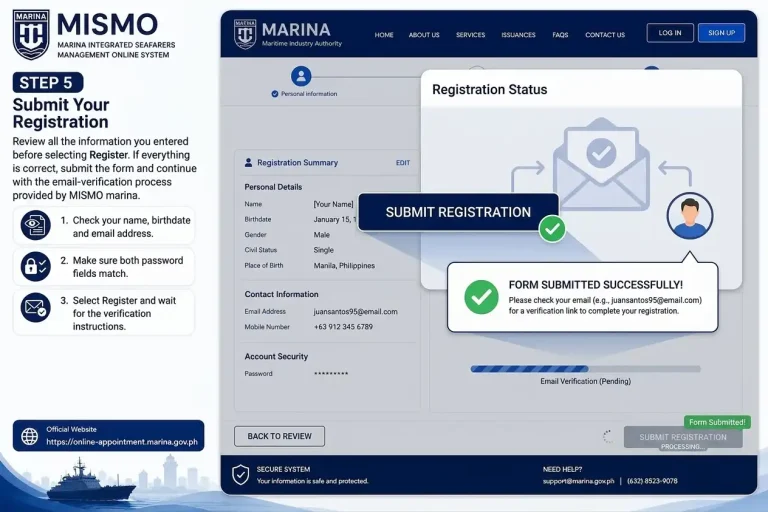
Step 5: Submit Your Registration
Review your information before selecting Register. Once submitted, follow the verification instructions displayed by the MISMO system or sent to your registered email address.
Important: Creating a MISMO account does not automatically book an SID or SRB appointment. Use the appropriate official platform for your specific transaction, and never share your password or verification codes with unauthorised individuals.
How to Verify Your MISMO Account
Email verification may be required to activate your MISMO account after registration. Once you submit the form, check the email address you provided for a verification message and follow the instructions included in it. If the message does not arrive, check your Spam or Junk folder and confirm that you entered the correct email address.
If the system provides a resend-verification option, use it to request another message. Open the verification link supplied by the official system and complete the activation process. After verification, return to the MISMO portal and sign in with your registered email address and password.
How to Complete Your MISMO Profile
After activating your account, sign in and review your personal information before starting a certification application or another MARINA transaction. Accurate details help reduce errors and potential delays when your information is checked against existing records.
Details to Check Before Proceeding
What Is an SRN in MISMO?
The Seafarer’s Registration Number (SRN) is an identifier associated with a seafarer’s MARINA records. If you already have an SRN, use the number linked to your existing record whenever the system requests it.
Avoid creating duplicate accounts or entering inconsistent personal details to bypass a registration problem. If you are unsure whether you already have a MARINA record, check the available account-recovery options or contact MARINA through its official channels for assistance.
Forgot Your MISMO Password?
If you cannot access your account because you have forgotten your password, look for the password-recovery option on the official MISMO login page. Follow the instructions provided to reset your credentials using the email address associated with your account.
For security, never share your password or verification codes with another person, and avoid entering your credentials on unofficial websites.
How to Book a New SID or SRB Appointment in 2026
Seafarers applying for the issuance, renewal, or replacement of a Seafarer’s Identity Document (SID) or Seafarer’s Record Book (SRB) should follow the updated MARINA appointment procedure. Under the change announced in MARINA Advisory No. 2026-24, effective 13 May 2026, new appointments for these services are processed exclusively through the eGovPH App.
Step 1: Open the Official eGovPH App
Download and open the official eGovPH App on your mobile device. If you already have an account, sign in with your existing credentials. Otherwise, create an account and follow the registration instructions.
Official website: eGovPH
Step 2: Verify Your eGovPH Account
Complete the verification requirements shown in the app. Follow the instructions provided to make your account ready for accessing the available MARINA appointment services.
Step 3: Find the MARINA Appointment Service
Open the available government services section and search for MARINA or the relevant MARINA appointment service. Select the appropriate option displayed in the official app.
Step 4: Choose SID or SRB
Select the document service that matches your requirement:
Enter the requested personal information and review your details before proceeding.
Step 5: Select an Appointment Date and Venue
Check the available schedules and processing locations displayed by the system. Choose a suitable date and venue based on the available options, then review the appointment details carefully.
Step 6: Confirm Your Appointment
Verify the information in your appointment summary before confirming your booking. Complete any applicable payment by following the instructions provided through the official system. Keep the confirmation and appointment reference for future use.
Step 7: Attend Your MARINA Appointment
Arrive at the selected processing location on your scheduled date and bring the required documents for your application. Follow the instructions provided in your appointment confirmation and the latest MARINA guidance.
Important: Check the official requirements for your specific SID or SRB transaction before travelling. If MARINA specifies an arrival time, documentary checklist, or payment procedure, follow those instructions. Do not assume that every certification service uses the same appointment process as SID and SRB applications.
Three Things to Remember Before Your MARINA Transaction
Before using MISMO or booking a MARINA appointment, understand which platform handles your particular service. Following the correct process can help you avoid unnecessary delays, protect your personal information, and reduce the risk of dealing with unauthorised appointment providers.
MISMO Registration Checklist
Before completing your account setup, review the following checklist.
Completing these checks before starting a transaction can help prevent avoidable account and application problems. Never pay an unofficial individual who claims to guarantee an appointment or offer special access to MARINA services.
How to Log In to MISMO
To access your seafarer account, open the official MARINA MISMO portal and navigate to the login page. Enter the email address and password associated with your registered account, then follow the on-screen instructions to sign in.
After successful login, you can review your account information and access the services available to your profile. The options displayed may vary depending on your account and the transaction you need to complete.
How to Recover Your MISMO Password
If you cannot remember your password, use the account-recovery option rather than registering for another account.
- Open the official MISMO login page.
- Select Forgot Password, if available.
- Enter the email address associated with your account.
- Follow the password-reset instructions provided by the system.
- Return to the portal and sign in using your updated credentials.
If you do not receive a reset email, check your Spam or Junk folder and confirm that you entered the correct email address. If recovery still fails, contact MARINA through its official support channels.
Keep your login credentials private, and never share verification codes with anyone claiming to provide faster appointment access.
What to Do Inside Your MISMO Dashboard
Once you have logged in, review your profile and existing records before starting a new certification application or another MARINA transaction. Your personal details should match your official documents to help avoid discrepancies during processing.
Depending on the services available to your account, check the following information:
Tips for Avoiding Application Delays
Before submitting an application, ensure that all required fields are complete and that uploaded documents are clear, readable, and consistent with your official records. Follow the file-format and document requirements specified by MARINA rather than uploading unsuitable files simply to complete the form.
If you discover an error in your personal information or existing seafarer records, seek guidance through the official MARINA support channels before submitting a transaction that depends on those details.
Applying for a Certificate of Proficiency (COP)
A Certificate of Proficiency (COP) is a maritime certification issued under applicable MARINA requirements for qualified seafarers. Depending on the certificate and transaction, applicants may be able to submit their applications and supporting documents through the MISMO online system.
Before beginning your application, identify the specific COP you need and review the latest requirements published by MARINA. The required documents may differ according to the certificate type, training completed, qualifications, and existing records.
Documents to Check Before Submitting
When uploading files, make sure the information is readable, all required pages are included, and each document matches the requested category. Follow the instructions displayed in the official system and retain any application reference provided after submission.
Certificate of Competency (COC) Applications
A Certificate of Competency (COC) is an important qualification for eligible seafarers serving in officer positions. MARINA’s requirements depend on the type of certificate and whether the application involves initial issuance, revalidation, or another certification transaction.
Certain COC applications can be submitted online through the MARINA system. However, the available process and supporting documents vary according to the applicant’s qualifications and the transaction being requested.
Prepare Before Starting a COC Application
Depending on your application, you may need the following records:
Check the current official documentary requirements before submitting your application. An outdated checklist may not reflect the requirements for your particular certificate or application category.
Understanding MISMO Applications and Evaluation Schedules
When using MISMO Philippines, it is important to distinguish between submitting an online application and completing any required evaluation or appointment. Submitting a form does not necessarily mean that your certification has been approved or that every processing step is complete.
Depending on the transaction, you may need to select an evaluation schedule, provide additional documents, complete a payment step, or wait for MARINA to review your application.
What to Check Before Confirming a Schedule
Choose a schedule you can attend if your application requires an in-person visit. Follow the instructions issued for your particular transaction, as procedures may differ between certification services.
The 2026 MARINA SID and SRB Appointment Update
An important change affects seafarers seeking a new MARINA online appointment for a Seafarer’s Identity Document (SID) or Seafarer’s Record Book (SRB).
According to MARINA Advisory No. 2026-24, effective 13 May 2026, new appointments for SID and SRB issuance, renewal, and replacement are processed exclusively through the eGovPH App. This means applicants should follow the updated eGovPH procedure rather than relying on older instructions for the previous standalone appointment system.
This change applies specifically to the relevant SID and SRB appointments. It does not mean that every MARINA certification application must be completed through eGovPH.
How to Book a SID or SRB Appointment Through eGovPH
For a new SID or SRB appointment, follow the current instructions provided by MARINA and the eGovPH App.
Step 1: Install the Official eGovPH App
Download the official eGovPH App from your device’s recognised app store. Open the application and confirm that you are using the legitimate government service.
Step 2: Create an Account or Sign In
If you are a new user, follow the registration instructions to create an eGovPH account. Existing users can sign in using their current credentials.
Step 3: Complete Account Verification
Follow the verification steps displayed in the application. Check your personal information carefully before accessing the available government services.
Step 4: Search for the MARINA Appointment Service
Open the government services section and search for MARINA or MARINA OAS. Select the relevant appointment service if it is displayed in the app.
Step 5: Select Your SID or SRB Transaction
Choose the appropriate document service and provide the information requested by the system. Select an available processing location, appointment date, and time where these options are provided.
Step 6: Review and Confirm Your Booking
Check your appointment details before confirming. Follow the displayed instructions for any applicable payment and save your confirmation for reference.
Step 7: Attend Your Appointment
Visit the selected MARINA processing centre on the scheduled date. Bring the documents required for your particular SID or SRB application and keep your appointment confirmation accessible.
Before travelling, review the latest official instructions for your appointment. Follow any specified arrival-time requirements and ensure you have all the required documents to avoid an unnecessary second visit.
Can You Still Use the Old MARINA OAS for SID/SRB?
For new Seafarer’s Identity Document (SID) and Seafarer’s Record Book (SRB) appointments after 13 May 2026, applicants must follow the updated eGovPH App procedure announced by MARINA. The change applies to new appointments for the issuance, renewal, and replacement of these documents.
Applicants who booked their appointments before the transition do not need to book again solely because the appointment system changed. Previously confirmed appointments remain valid under the announced arrangement. This distinction is important when following older online guides that may still describe the previous MARINA Online Appointment System (OAS) process.
Before making a booking, check the latest official MARINA announcements to confirm the correct procedure for your transaction.
How to Track Your MARINA Application
After submitting a transaction through MISMO or another applicable MARINA service, keep your application reference number, confirmation details, and any relevant receipts. Depending on the transaction, you may be able to review its status through the relevant online system or receive further instructions from MARINA.
If your application is returned for correction or requires clarification, read the instructions carefully before taking action. You may be able to update the existing application instead of submitting a new one or creating another MISMO account.
What to Check if MARINA Requests Clarification
- Identify the information or document that needs correction.
- Make sure the uploaded file is clear and readable.
- Check whether the document meets the applicable requirements.
- Confirm that all required pages have been included.
- Verify that your personal information matches your official records.
- Follow MARINA’s instructions for resubmission or further processing.
Common MISMO Application Mistakes to Avoid
Even when the MISMO portal is accessible, errors in personal information or supporting documents can cause unnecessary delays.
1. Creating Multiple Accounts
If you already have a MISMO account, use the official account-recovery process if you cannot sign in. Creating another account may complicate the matching of your existing seafarer records.
2. Uploading Unclear Documents
Blurry scans, incomplete pages, or incorrectly uploaded files can make document verification more difficult. Check every file before submitting your application.
3. Selecting the Wrong Transaction
Read the service description carefully before proceeding. A Certificate of Proficiency (COP), Certificate of Competency (COC), Seafarer’s Identity Document (SID), and Seafarer’s Record Book (SRB) are different services with different requirements.
4. Following Outdated Appointment Instructions
Older guides may describe the previous standalone booking procedure. For new SID and SRB appointments, follow the applicable eGovPH instructions introduced in May 2026.
5. Using Unofficial Appointment Agents
Use official government platforms for registration, applications, and appointments. Avoid individuals who promise guaranteed slots, request your password, or ask for verification codes.
MISMO, eGovPH and MARINA: Which One Should You Use?
| Your requirement | Where to start |
|---|---|
| MISMO account registration and login | Official MARINA MISMO portal |
| Applicable STCW certification transactions | MISMO, according to the relevant MARINA procedure |
| COP application | Official MARINA certification process |
| COC-related application | MISMO, where applicable |
| New SID appointment | eGovPH App |
| New SRB appointment | eGovPH App |
| SID/SRB document verification | Relevant official MARINA verification service |
| General MARINA information | Official MARINA website |
The correct platform depends on the service you need. Not every MARINA transaction uses the same registration, application, or appointment process.
Common MISMO Problems and Solutions
MISMO Verification Email Not Received
If you have registered but have not received a verification email, check your mailbox before attempting registration again.
Try these steps:
- Check your Spam or Junk folder.
- Search your mailbox for “MARINA” or “MISMO.”
- Confirm that you entered the correct email address.
- Use the official resend-verification option if available.
- Wait a little longer if email delivery is delayed.
If the problem continues, contact MARINA through its official support channels.
Forgot Your MISMO Password?
You generally do not need to create a new account just because you forgot your password. Instead, use the recovery option available on the official MISMO login page.
- Open the official MISMO portal.
- Select Forgot Password, if available.
- Enter the email address associated with your account.
- Follow the password-reset instructions.
- Return to the login page and use your updated password.
If you no longer have access to your registered email address, seek assistance from MARINA rather than creating duplicate accounts.
MISMO Website Not Loading
If the MISMO portal does not open or responds slowly, the issue may be related to your browser, internet connection, or a temporary service interruption.
Try the following troubleshooting steps:
Document Upload Problems in the MISMO Portal
Uploading supporting documents is an important step in many MARINA online applications. If a file fails to upload, the problem may involve its format, file size, image quality, or another requirement specified by the application page.
If you encounter an upload error in the MISMO portal, try the following steps:
Avoid relying on file-size limits or document specifications from outdated online guides. Always follow the requirements displayed by the current MISMO transaction, as they may vary between services.
How to Prepare Documents for Upload
Before submitting a document, make sure it is:
If the transaction requires a multipage document, follow its specific instructions about whether the pages must be combined into one file or uploaded separately.
What If Your MARINA Application Is Returned?
A returned application does not automatically mean that MARINA has rejected it. Depending on the transaction, the agency may need additional information, corrected documents, or clarification before processing can continue.
If your application is returned, review the notification and identify the exact issue before making changes.
- Read the reason provided by MARINA.
- Identify the information or document requiring correction.
- Replace incomplete, unclear, or incorrect files as necessary.
- Recheck your personal details and supporting information.
- Resubmit the application according to the instructions provided.
Avoid changing unrelated information unless MARINA specifically requests it. If the reason for the return is unclear, seek guidance through the appropriate official support channel before resubmitting.
What If Your SRN Is Already Linked?
An “SRN already linked” message may appear when your Seafarer’s Registration Number (SRN) is associated with an existing MARINA record or account.
If you encounter this message, do not immediately create another MISMO account. First, consider whether you may have registered previously or used a different email address.
Check whether you have:
If you cannot resolve the issue using the available account-recovery options, contact MARINA through its official channels and ask for assistance with your existing record.
MARINA Appointment Problems and Solutions
Appointment availability may depend on the service, processing location, and available schedules. If you cannot find your preferred date or the expected booking option, verify that you have selected the correct transaction and are using the appropriate platform.
Try these steps:
Important SID and SRB Appointment Update for 2026
For new appointments involving the issuance, renewal, or replacement of a Seafarer’s Identity Document (SID) or Seafarer’s Record Book (SRB), MARINA announced the move to the eGovPH App effective 13 May 2026.
Previously confirmed appointments made before the transition remain valid under the announced arrangement. If you are trying to book a new SID or SRB appointment through an older standalone process, consult the current eGovPH instructions instead.
Is MISMO the Same as the MARINA Online Appointment System?
No. Although these services are related to MARINA, they serve different purposes. Understanding the distinction can help you choose the correct starting point for your application.
| Service or requirement | Platform to check |
|---|---|
| MISMO account registration and login | Official MARINA MISMO portal |
| Applicable COP transactions | MISMO, according to the relevant procedure |
| Applicable COC transactions | MISMO, where supported |
| New SID appointment | eGovPH App |
| New SRB appointment | eGovPH App |
| General maritime announcements | Official MARINA website |
The MARINA Integrated Seafarers Management Online (MISMO) system supports applicable seafarer account and certification services, while an online appointment system handles scheduling for specific transactions. The correct process depends on the service you need.
Frequently Asked Questions About MISMO Philippines
Conclusion
The MISMO Philippines 2026–2027 system is an important online resource for Filipino seafarers who need to manage their MARINA accounts and access applicable certification services. Understanding how to register, log in, maintain personal information, submit supporting documents, and monitor application progress can help make the process more organised.
It is equally important to understand the updated appointment procedure. Effective 13 May 2026, new appointments for the issuance, renewal, and replacement of Seafarer’s Identity Documents (SID) and Seafarer’s Record Books (SRB) are processed through the eGovPH App, while appointments confirmed before the transition remain valid under the announced arrangement.
Before starting any transaction, verify the latest requirements through the official MARINA website and use the appropriate government platform for your service. Protect your login credentials, avoid unauthorised appointment agents, and keep your application references and confirmations for future use.