
One STI Student Portal Philippines 2026-2027: Complete Login, Grades, Schedule & Student Guide
The One STI Student Portal Philippines 2026–2027 is an online platform designed to help STI College students conveniently access important academic information and manage their school-related activities. Through the One STI Student Portal, students can log in to view their grades, check class schedules, review account balances, and access relevant student records. The portal provides a convenient way to stay updated on academic progress and essential school information without having to visit the campus for every inquiry.
STI College also offers online services for applicants and students who need to complete admission and enrolment procedures. It is important to understand the difference between the One STI Portal and the STI online application or enrolment system to ensure you use the correct platform. In this guide, you will learn how to complete the One STI Student Portal Login, access your academic records, check grades and class schedules, understand the required Microsoft Office 365 credentials, and troubleshoot common login issues. We also cover useful information about STI online enrolment and other student services for the 2026–2027 academic year.
What Is the One STI Student Portal?
The One STI Student Portal Philippines is an online platform developed for STI College students to access essential academic information and school-related services. Through the STI One Student Portal, students can conveniently check their grades, view class schedules, review account balances, and access available student records. It provides a centralized way to manage important academic details and stay informed throughout the school year.
It is important to distinguish between the One STI Student Portal and the STI online application system. The One STI Portal is intended for currently enrolled students who want to access their academic information, while apply.sti.edu is a separate platform for admission, application, and enrolment-related activities. Understanding the purpose of each platform helps students select the right service and avoid login confusion.
One STI Student Portal at a Glance
| Feature | Purpose |
|---|---|
| One STI Login | Access your STI student account |
| Grades | View available academic results |
| Class Schedule | Check your scheduled classes |
| Student Records | Review available academic information |
| Balance Information | Check school balances and payment details |
| Online Application | Complete application and enrolment-related procedures |
| Account Assistance | Get help with login and account-related concerns |
The available features may vary depending on your STI campus, student account, and the services currently enabled by the institution.
One STI Student Portal Login: What You Need
Before accessing the One STI Student Portal Login Philippines, make sure you have your official STI Microsoft Office 365 account credentials. These details are required to authenticate your student account and access the available portal services.
New students who have not received their login information should check their Registration and Assessment Form or contact their School Laboratory Facilitator for assistance. According to the provided STI login instructions, the official school email address is printed in the lower-left section of the Registration and Assessment Form.
Students who still have an older @sti.ph email address should also check whether they need to use the updated @sti.edu.ph email format when signing in.
One STI Login Requirements
Prepare the following information and resources before starting the login process:
- Official STI email address: Your assigned Microsoft Office 365 student account.
- Account password: The current password associated with your STI email.
- Student information: Your Registration and Assessment Form or other relevant student details.
- Internet connection: A stable connection to avoid interruptions during sign-in.
- Supported browser: Use an updated browser such as Google Chrome, Microsoft Edge, or Safari.
Security reminder: Keep your STI Microsoft Office 365 login credentials private. Never share your password through public comments, social media messages, or unofficial websites. Always verify that you are using the correct STI platform before entering your account information.
How to Log In to the One STI Student Portal
Students can access the One STI Student Portal Philippines through STI College’s online platform using their official Microsoft Office 365 student account. The login process allows enrolled students to authenticate their accounts and access the academic information and services available to them. Homepage.
Before starting, make sure you have your STI school email address and current password. Follow these six steps to complete your One STI Student Portal Login successfully.
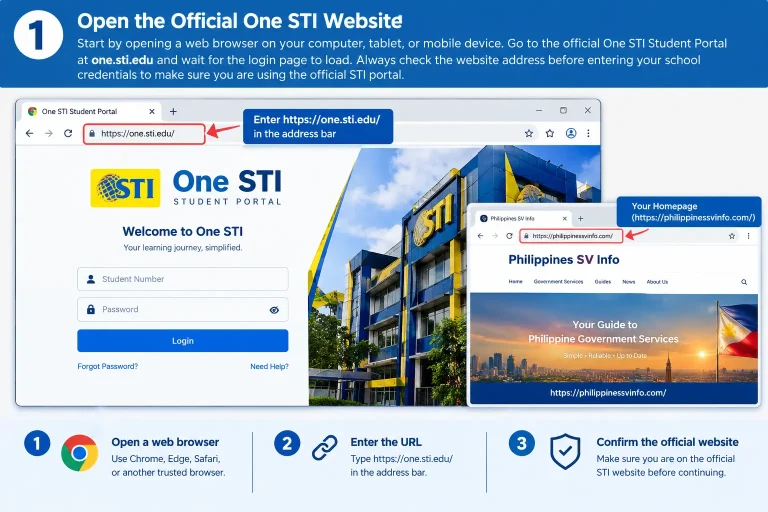
Step 1: Open the Official One STI Website
First, open a web browser on your computer, laptop, tablet, or mobile phone. Visit the official One STI website at one.sti.edu to access the student login page. Make sure the website address is correct before entering any personal or school account information.
- Open Google Chrome, Microsoft Edge, Safari, or another trusted browser.
- Visit https://one.sti.edu/.
- Wait for the official One STI website to load completely.
- Check the website address before proceeding.
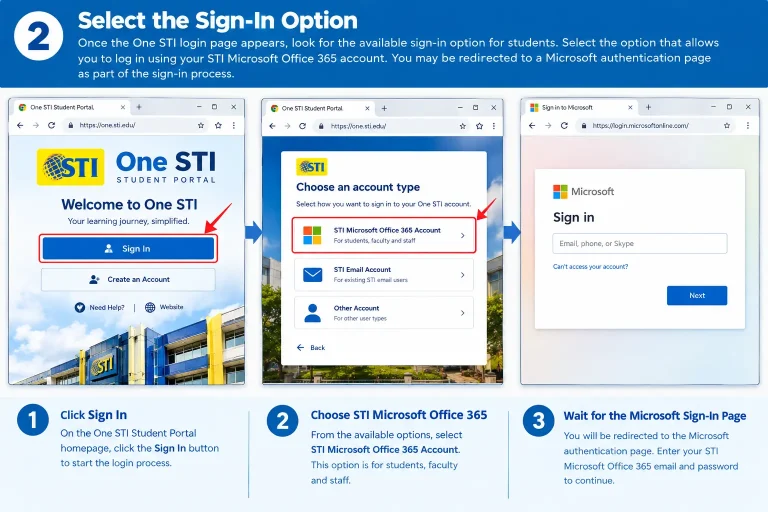
Step 2: Select the Sign-In Option
After opening the website, locate the sign-in option displayed on the page. Select the appropriate option to continue using your STI Microsoft Office 365 account. The system may redirect you to Microsoft’s authentication page to verify your student account.
- Find and select the Sign In option.
- Choose the STI Microsoft Office 365 account option if displayed.
- Wait for the Microsoft login page to open.
- Continue to the next step when the authentication screen appears.
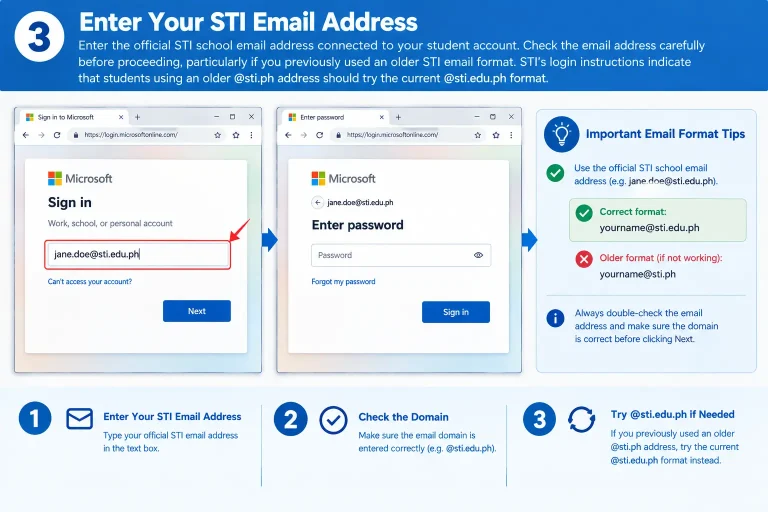
Step 3: Enter Your STI Student Email Address
On the Microsoft sign-in page, enter the official email address assigned to you by STI College. Make sure you use the correct school email format associated with your student account. Students who previously used an older @sti.ph email address should check whether the updated @sti.edu.ph format applies to their account.
- Enter your official STI student email address.
- Check the spelling and email domain carefully.
- Use the updated @sti.edu.ph format if instructed by STI.
- Select Next to continue.
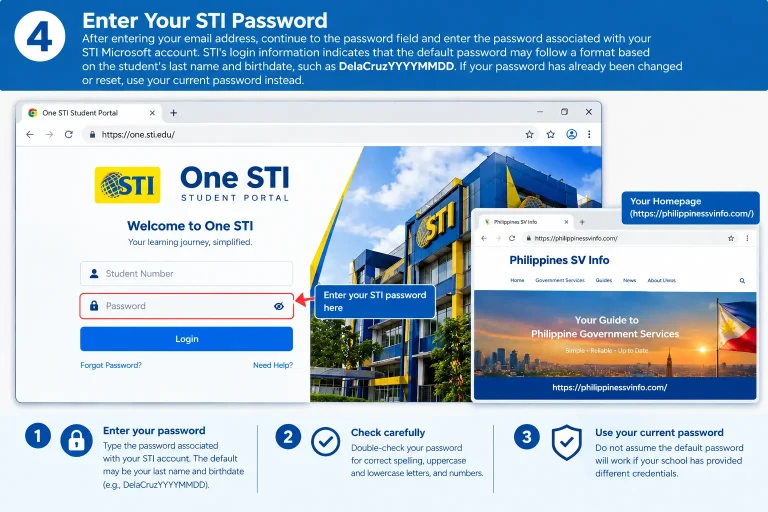
Step 4: Enter Your STI Account Password
Once your email address has been accepted, the system will ask you to enter your Microsoft Office 365 account password. Type your current password carefully and make sure there are no unnecessary spaces or typing errors.
Some STI login instructions mention a default password format based on the student’s last name and birthdate, such as DelaCruzYYYYMMDD. However, this format may not apply to every student, particularly if the password has already been changed.
- Enter your current STI account password.
- Check that Caps Lock is not causing typing errors.
- Use the password provided by your school if you are a new student.
- Select Sign In to continue.
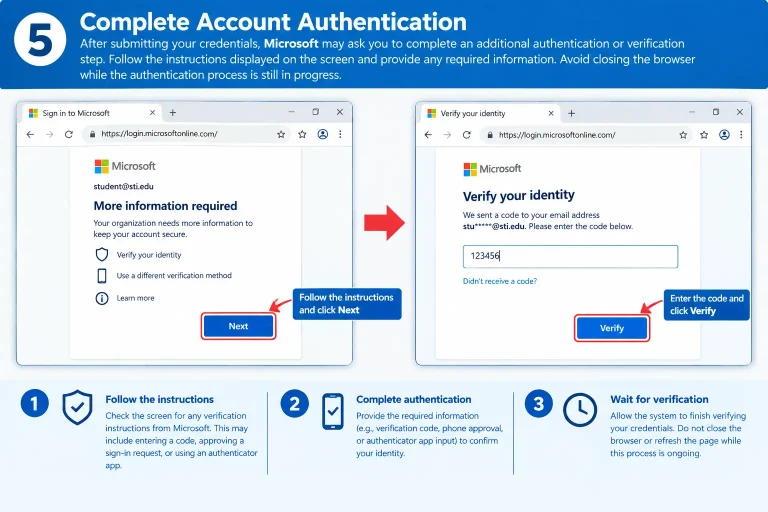
Step 5: Complete Microsoft Account Verification
After submitting your login information, Microsoft may request additional account verification. Depending on your account settings, you may need to approve a verification request or follow another authentication instruction displayed on the screen.
- Follow the verification instructions provided by Microsoft.
- Complete any additional authentication requirements.
- Confirm your account when prompted.
- Wait until the verification process is finished.
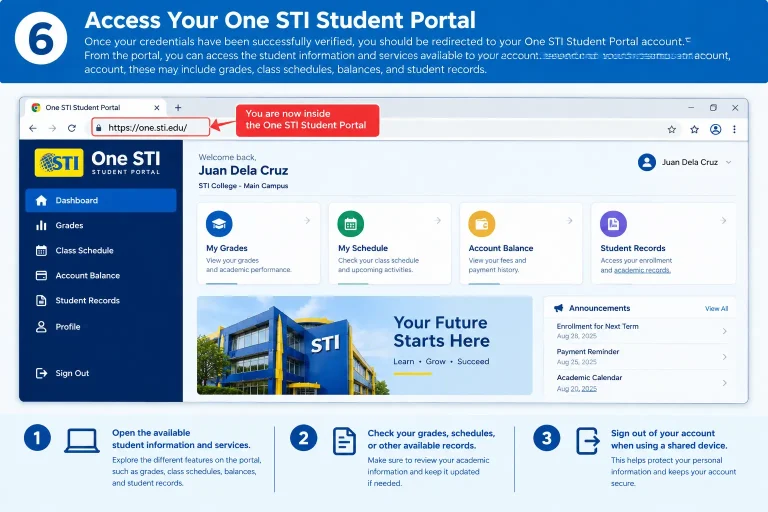
Step 6: Access Your One STI Student Portal Dashboard
After successful authentication, you should be able to access the One STI Student Portal and view the services available to your student account. Explore the dashboard to find academic information, class schedules, balances, and other available student records.
- Open the available student services.
- Check your grades and academic information.
- Review your class schedule and account details.
- Sign out after finishing, especially when using a shared computer.
What Can You Check After One STI Login?
After completing your One STI Student Portal Login, you can access the academic information and student services made available through your account. The platform provides a convenient way to review important school details without relying entirely on manual enquiries or campus visits.
The available information may differ depending on your STI campus, student status, and account permissions. Below are some of the main areas students may be able to access through the portal.
Grades and Academic Information
The One STI Portal provides access to available academic information, including grades and student records. Students can use these details to monitor their academic progress and review results during the school year.
Checking your grades regularly helps you stay informed about your performance in different subjects. If a grade is missing, incomplete, or different from the result communicated by your instructor, contact the appropriate STI academic office for clarification.
Class Schedule
Students can use the One STI Student Portal to review available class schedule information. This makes it easier to keep track of subjects, planned classes, and other academic arrangements throughout the semester.
Before a new term begins, check your schedule to confirm the information available in your account. If there are missing subjects, incorrect class details, or schedule changes, contact your campus for the latest information.
Balances and Payment Information
Another useful area of the One STI Student Portal is the availability of student balance and payment-related information. Depending on your account, you may be able to review outstanding balances and other financial details associated with your student record.
If you have recently paid your school fees but the transaction is not yet reflected in the portal, keep your official payment receipt and contact the appropriate STI accounting office. Avoid making a second payment until the previous transaction has been verified.
Student Records and Account Information
The portal may also provide access to student-related information connected with your STI account. These records help students review relevant academic and personal details maintained by the institution.
Always check the accuracy of the information displayed. If you notice outdated or incorrect details, ask your STI campus how to request an official update.
Quick Tip: After every One STI Login, review your available academic information and make sure your account details are correct. If information appears incomplete or outdated, contact your STI campus for assistance rather than creating another account or repeatedly changing your password.
Grades in the One STI Student Portal
The One STI Student Portal Philippines provides students with online access to available academic information, including subject grades and student records. After completing the One STI Student Portal Login, students can review their academic results, monitor their performance, and stay updated on their progress throughout the semester.
STI College follows a numerical grading system in which lower numerical values generally represent better academic performance. For example, 1.00 represents excellent performance, while 3.00 is generally considered a passing grade and 5.00 indicates failure. Understanding the grading scale helps students interpret their academic results and identify subjects that may require additional attention.
STI College Grading Scale
| Grade | Description |
|---|---|
| 1.00 – 1.25 | Excellent |
| 1.50 – 1.75 | Very Good |
| 2.00 – 2.25 | Good |
| 2.50 – 2.75 | Satisfactory |
| 3.00 | Passing |
| 5.00 | Failed |
Note: This is a general grading reference, not a verified universal STI grading table. Actual grade descriptions, passing requirements, and grading policies may vary depending on the program, subject, and applicable campus regulations. Always refer to your official STI academic records and course syllabus.
How to Check Grades in the One STI Student Portal
Checking your academic results through the One STI Portal is a convenient way to monitor your performance without visiting the campus for every grade inquiry. Depending on the portal features available to your account, you may be able to view individual subject results and grading-period information.
Follow these steps to check your grades:
Step 1: Log In to the One STI Student Portal
Visit https://one.sti.edu/ and sign in using your official STI Microsoft Office 365 email address and current password. Complete any additional verification required to access your student dashboard.
Step 2: Open Your Academic Records
Once you reach your dashboard, look for the Grades, Academic Records, or equivalent section, if available. Select the appropriate option to access your academic information.
Step 3: Select Your Semester or Grading Period
If the portal provides different academic periods, choose the relevant semester or grading period you want to review. Your subjects and available academic results may appear according to the selected term.
Step 4: Review Your Subject Grades
Check the grades displayed beside each subject. Review the available results carefully and compare them with your previous academic records to monitor your progress.
Step 5: Confirm Your Academic Results
If a subject grade is missing or appears incorrect, first check whether your instructor has officially released the results. If the information remains unavailable or inconsistent, contact your instructor or the appropriate STI academic office for assistance.
Important: Subject grades may cover different assessment periods, including Prelim, Midterm, Pre-Final, and Final. Their grading weights depend on the applicable course requirements. Always use your official syllabus and academic records when calculating or interpreting your final grade.
Grades in the One STI Student Portal
The One STI Student Portal Philippines allows STI College students to access available academic information, including subject grades and student records. After completing the One STI Student Portal Login, students can review their academic results, monitor their performance, and stay informed about their progress throughout the semester.
STI College uses a numerical grading system in which lower numerical values generally indicate better academic performance. For example, 1.00 represents excellent performance, while 3.00 is generally considered passing and 5.00 indicates a failed grade. Understanding the grading system helps students evaluate their results and identify subjects that may need additional attention.
STI College Grading Scale
| Grade | Description |
|---|---|
| 1.00 – 1.25 | Excellent |
| 1.50 – 1.75 | Very Good |
| 2.00 – 2.25 | Good |
| 2.50 – 2.75 | Satisfactory |
| 3.00 | Passing |
| 5.00 | Failed |
Note: This table provides a general grading reference and should not be treated as a universal official STI grading scale. Grade descriptions, passing requirements, and academic policies may vary by program, subject, and campus. Always consult your official STI academic records and course syllabus.
How to Check Grades in the One STI Student Portal
Checking your academic results through the One STI Portal makes it easier to monitor your performance and review available subject grades online. Depending on the services enabled for your account, you may also be able to access information about different semesters and grading periods.
Follow these steps to check your academic results:
Step 1: Log In to the One STI Student Portal
Visit the official One STI Student Portal and sign in using your STI Microsoft Office 365 email address and current password. Complete any required verification to access your student dashboard.
Step 2: Open Your Academic Records
After logging in, look for the Grades, Academic Records, or similar section on your dashboard, if available. Select the relevant option to view your academic information.
Step 3: Select Your Semester or Grading Period
If multiple academic periods are available, choose the semester or grading period you want to check. The portal may display your enrolled subjects and corresponding results based on your selection.
Step 4: Review Your Subject Grades
Check the grades displayed beside each subject. Review your academic results carefully and compare them with previous records to understand your progress throughout the semester.
Step 5: Confirm Your Academic Results
If a subject grade is missing or appears incorrect, check whether your instructor has officially released the results. If the issue continues, contact your instructor or the appropriate STI campus office for clarification.
Important: Academic assessments may include Prelim, Midterm, Pre-Final, and Final grading periods. The weight assigned to each assessment depends on the subject and applicable course requirements. Always refer to your official syllabus when calculating or interpreting your final grade.
One STI Student Portal System Requirements
Before accessing the One STI Student Portal Philippines, make sure your device and internet connection meet the basic requirements. Using an updated browser and a compatible device can help you avoid common loading, sign-in, and display problems.
The portal can be accessed through different devices, including desktop computers, laptops, tablets, and smartphones. Below are the recommended requirements for a smoother login experience.
| Requirement | Recommended Details |
|---|---|
| Device | Desktop, laptop, tablet, or smartphone |
| Operating System | Windows, macOS, Android, or iOS |
| Web Browser | Google Chrome, Microsoft Edge, Safari, or another updated browser |
| Internet Connection | Stable internet connection |
| Screen Display | Clear display for viewing the login page and student dashboard |
| STI Account | Active student account with valid login credentials |
| Browser Settings | Enable JavaScript and cookies if required |
| Security | Use a trusted device when entering account credentials |
One STI Student Portal: Important Points to Remember
The One STI Student Portal gives STI College students convenient online access to available academic information and student services. To avoid unnecessary login problems, remember a few important points before using the platform.
- Use your official STI account: Sign in with the Microsoft Office 365 credentials assigned to your student account.
- Check your email format: Make sure you are using the correct STI email address, including the appropriate @sti.edu.ph domain when required.
- Protect your password: Never share your login credentials with other people or enter them on unofficial websites.
- Check your academic information: Review your available grades, class schedules, and student records regularly.
- Contact your campus for assistance: If your account is inactive, inaccessible, or contains incorrect information, contact the appropriate STI office.
- Use the correct enrolment platform: Remember that apply.sti.edu is separate from the One STI Student Portal and is used for application and enrolment-related activities.
How to Complete STI Enrollment Onsite
Students who prefer personal assistance can complete their STI College Enrollment Philippines by visiting their preferred STI campus. The onsite process allows applicants to communicate directly with admissions staff, ask questions about available programs, submit required documents, and receive guidance about assessment and payment procedures.
Although the exact requirements may differ depending on the campus and student category, the following steps explain the general onsite enrolment process.
Step 1: Visit Your Preferred STI College Campus
Start by visiting the STI campus where you want to study. Before travelling, check the campus office hours and confirm whether your preferred program is accepting applicants.
- Visit your preferred STI College campus.
- Ask about available courses and academic programs.
- Confirm the admission requirements and office schedule.
- Bring your available educational and identification documents.
Step 2: Request the Application or Assessment Form
Proceed to the admissions, registrar, or designated enrolment office and request the appropriate application or assessment form. Provide accurate personal and educational information to avoid errors during the registration process.
- Request the required application or assessment form.
- Enter your personal and educational details.
- Review the information before submitting the form.
- Ask the admissions staff if you need help completing any section.
Step 3: Complete the Assessment Process
After submitting your application information, follow the assessment instructions provided by the STI admissions team. The campus may review your educational background, submitted information, and program requirements before proceeding with the next enrolment steps.
- Follow the instructions given by the admissions staff.
- Complete any required assessment or evaluation.
- Provide additional information if requested.
- Confirm the next steps before leaving the office.
Step 4: Pay the Required Enrollment Fees
Once your assessment or application has been processed, proceed to the designated Cashier’s Office to settle the applicable fees. The amount may depend on your selected program, student category, and campus requirements.
- Visit the designated STI Cashier’s Office.
- Confirm the amount payable before making a transaction.
- Pay the applicable enrolment or assessment fees.
- Keep your Official Receipt or payment confirmation for future reference.
Step 5: Submit the Required Documents
Submit the necessary admission documents to the appropriate STI office for verification. The requirements may vary depending on whether you are a new student, transferee, or returning student.
Commonly requested documents may include:
- Form 138 or Report Card, when applicable.
- Birth Certificate.
- Previous school records, if required.
- Valid identification documents, when requested.
- Other supporting documents specified by the campus.
Make sure your documents are complete and readable. If any document is unavailable, ask the admissions staff about the accepted alternatives or submission deadline.
Step 6: Finalize Your STI Enrollment
After completing the required assessment, payment, and document submission, follow the remaining instructions provided by your STI campus. Confirm that your enrolment has been processed and ask about your student account and class-related information.
- Confirm that your enrolment requirements are complete.
- Ask about your student number and account credentials.
- Check your class schedule when it becomes available.
- Keep your enrolment documents and payment receipts safely.
Online vs Onsite STI Enrollment
STI College offers different enrolment routes depending on the applicant’s needs and student status. Some students may prefer the convenience of online application, while others may find it easier to visit a campus and receive direct assistance.
| Registration Method | Where You Start | Best Suited For |
|---|---|---|
| Online Enrollment | apply.sti.edu | Applicants who prefer online application procedures |
| Onsite Enrollment | Preferred STI College campus | Students who need face-to-face assistance |
| Existing Student Registration | STI-designated student enrolment process | Currently enrolled students continuing their studies |
Important: Application and enrolment procedures may differ for new applicants, transferees, and existing STI students. Before submitting information or making payments, confirm the current requirements with your preferred campus. Also, remember that the One STI Student Portal is primarily for accessing student information, while the separate application platform handles admission-related activities.
Common One STI Student Portal Problems
Sometimes students experience login difficulties when accessing the One STI Student Portal. These issues may be related to incorrect Microsoft account credentials, outdated email formats, or problems connecting the school email address to the student record.
The following table explains common login problems and the recommended solutions.
| Problem | What to Check | Suggested Solution |
|---|---|---|
| Cannot sign in | STI email and password | Verify your official login credentials |
| Old email domain | @sti.ph or @sti.edu.ph | Check the current email format assigned by STI |
| Account not linked | Student record connection | Contact the School Registrar |
| Default password not working | Password format or account status | Contact the School Laboratory Facilitator |
| Still unable to access | Account or technical issue | Contact STI through its official support channel |
According to STI’s published login instructions, students who receive an account-linking error should contact the School Registrar. Those who do not know their login credentials can request assistance from their School Laboratory Facilitator.
How to Keep Your One STI Student Account Secure
Your One STI Student Portal account may contain personal and academic information. Protecting your login credentials is therefore important to prevent unauthorized access and keep your student information safe.
Follow these security recommendations:
- Keep your STI Microsoft Office 365 password private.
- Never share your login details in public groups or social media comments.
- Always verify the website address before entering your credentials.
- Avoid saving your password on shared or public computers.
- Sign out of your account after using a shared device.
- Contact your STI campus if you suspect unauthorized access.
Always use the official One STI Student Portal when signing in. Avoid entering your student email address or password on unfamiliar websites that claim to provide STI login services.
One STI Student Portal vs STI Application Portal
Many students confuse the One STI Student Portal with the STI online application website. Although both platforms support student-related activities, they have different purposes.
Understanding the difference can help you choose the correct service when accessing your academic information or completing admission procedures.
| Service | Main Purpose | Who Uses It |
|---|---|---|
| One STI Student Portal | Access existing student information | Current STI students |
| STI Online Application | Application and enrolment-related activities | New and continuing students |
| STI Campus | Face-to-face admission and enrolment assistance | Applicants and students |
| STI Microsoft Office 365 Account | Student authentication for One STI | STI students with active school accounts |
| STI Admissions/Registrar Office | Student records and enrolment assistance | Applicants and students |
| STI Cashier | Payment of applicable school fees | Applicants and enrolled students |
What If Your STI Account Is Not Working After Enrollment?
New students may sometimes experience difficulties accessing the One STI Student Portal after completing their enrolment. This can happen when the school account has not been properly connected to the student record or when the login credentials are incorrect.
Follow these steps to identify the problem and request assistance.
Step 1: Check Your STI Microsoft Account
Before contacting the school, verify that you are using the official Microsoft Office 365 account assigned to you by STI College.
- Enter your official STI student email address.
- Check the spelling and email domain.
- Make sure you are using your current account password.
- Confirm that you are accessing the official One STI website.
Step 2: Contact the Appropriate School Office
If your credentials are correct but the portal displays an account-linking message, contact your School Registrar. New students who have not received their login information should approach their School Laboratory Facilitator.
- Contact the School Registrar for student record and account-linking issues.
- Contact the School Laboratory Facilitator if you need your login credentials.
- Provide the necessary student information when requesting assistance.
Step 3: Contact One STI Support
If the problem continues after contacting the appropriate school office, use the support information provided by STI. The published One STI login information identifies oneapp@sti.edu as a contact for account-related concerns.
- Explain the login problem clearly.
- Include relevant student or account details when requested.
- Contact oneapp@sti.edu for further assistance.
Never include your password in an email or support request.
One STI Student Portal: Important Things to Remember
Using the One STI Student Portal Philippines becomes easier when you understand which STI website is designed for each task. The student portal provides access to existing student information, while the separate application platform handles admission and registration activities.
If you experience login difficulties, avoid creating another account immediately. First, check your official STI email address, current password, and connection between your Microsoft account and student record.
Keep Your STI Login Credentials Ready
Your official STI Microsoft Office 365 account is required for a One STI Student Portal Login. If you cannot find your school email address, check your Registration and Assessment Form.
New students who have not received their credentials can contact their School Laboratory Facilitator for assistance.
STI’s published login instructions refer to the @sti.edu.ph email format. If you are still using an older @sti.ph address, verify your current account details with STI before attempting another login.
Use the Correct STI Website
STI provides separate websites for student account access, applications, and general institutional information. Use the appropriate website according to the service you need.
| What You Want to Do | Official STI Website |
|---|---|
| Access your student account | One STI Portal |
| Apply or register | STI Application |
| Visit the main STI website | STI College |
For existing student information, use one.sti.edu. For admission and application activities, visit apply.sti.edu.
What to Do After Successfully Logging In
After completing your One STI Student Portal Login, take a few minutes to review the information available in your student account. Checking your academic and school-related details regularly can help you stay informed throughout the academic year.
Step 1: Check Your Grades
Start by reviewing your available grades and academic results. This helps you monitor your performance and identify any missing or incorrect information.
If you notice an issue with a subject grade, contact your instructor or the appropriate STI academic office for clarification.
Step 2: Review Your Class Schedule
Open the available class schedule section in your One STI Student Portal and review your subjects and class arrangements.
It is especially useful to check your schedule before a new semester begins. If some subjects are missing or the displayed information is incorrect, contact your STI campus.
Step 3: Monitor Your Student Balance
Review the balance and payment information available in your account. Keeping track of these details can help you identify outstanding balances and monitor recorded transactions.
If a recent payment does not appear in your account, keep your Official Receipt and contact the appropriate STI office for verification.
A Simple One STI Troubleshooting Checklist
If the One STI Student Portal does not open or you cannot access your account, follow these troubleshooting steps before requesting technical assistance.
1. Check the website address: Make sure you are visiting the official one.sti.edu website.
2. Verify your STI email: Use the official Microsoft account assigned to you by STI College.
3. Confirm the email domain: Check whether your account uses the current @sti.edu.ph format.
4. Re-enter your password: Check for typing mistakes and make sure Caps Lock is not affecting your password.
5. Contact your School Laboratory Facilitator: Ask for assistance if you are a new student who does not know their login credentials.
6. Contact the School Registrar: Request help if your Microsoft account needs to be linked to your student record.
7. Contact STI support: For persistent account problems, use the published support email oneapp@sti.edu.
Common Mistakes Students Should Avoid
Students can prevent many unnecessary login and enrolment problems by avoiding a few common mistakes when using STI’s online services.
| Common Mistake | What Students Should Do |
|---|---|
| Using an Unofficial Login Page | Access your account through the official one.sti.edu website. |
| Confusing One STI with Online Application | Use the student portal for existing student information and the application platform for admission activities. |
| Guessing Your Password Repeatedly | Verify your credentials and request assistance from your school. |
| Ignoring an Account-Linking Message | Contact the School Registrar to resolve student record connection issues. |
| Losing Payment Evidence | Keep your Official Receipt or payment confirmation after every transaction. |
When Should You Contact STI Directly?
Sometimes, problems with the One STI Student Portal cannot be resolved by simply entering your login details again or refreshing the page. If your account information, student records, or enrolment details require verification, contacting your STI campus is the best way to receive the appropriate assistance.
You should contact STI directly in the following situations:
- Email account issues: Your STI Microsoft Office 365 email is not connected to your student record.
- Missing login credentials: You have not received your official STI email address or password.
- Incorrect student information: Your personal or academic details appear incorrect in the portal.
- Enrolment concerns: Your application, registration, or payment requires additional verification.
- Repeated login errors: You still cannot access your account after checking your email address and password.
- Admission requirements: You need clarification about the documents required to complete your enrolment.
For account-linking problems, contact your School Registrar. If you do not know your login credentials, approach your School Laboratory Facilitator for assistance.
Quick Reference: One STI Student Portal
The following table summarizes the important login details, student services, and support channels associated with the One STI Student Portal.
| Question | Answer |
|---|---|
| Official Student Portal | one.sti.edu |
| Login Account | STI Microsoft Office 365 account |
| Current Email Format | @sti.edu.ph, when assigned |
| Forgotten Credentials | Contact School Laboratory Facilitator |
| Account Not Linked to Student Record | Contact School Registrar |
| Online Application | apply.sti.edu |
| Student Information | Available grades, schedules, balances, and records |
| Technical Support Email | oneapp@sti.edu |
The information above is intended to help students identify the appropriate STI platform and support channel. Support procedures and available services may change, so confirm the latest instructions with your campus when necessary.
Frequently Asked Questions About One STI Student Portal
1. How can I see my grades in STI?
To check your grades, visit the One STI Student Portal and sign in using your official STI Microsoft Office 365 account. After accessing your student dashboard, look for the Grades or Academic Records section, if available. Select the appropriate semester or grading period to review your posted subject results. If a grade is missing, contact your instructor or STI campus for clarification.
2. What can I check on the One STI Student Portal?
The One STI Student Portal provides access to student information and academic services available to your account. Depending on your campus and student record, you may be able to check:
- Subject grades and academic results.
- Class schedules and subject information.
- Student records and personal details.
- School balances and payment information.
- Other available academic services.
3. How do I apply for STI College?
You can start your application through the STI online application platform at apply.sti.edu. Follow the instructions to select your preferred campus and program, provide the required information, and complete the application process. You can also visit your preferred STI campus if you need assistance with admission and enrolment requirements.
4. Is STI College still open for enrollment?
STI College offers enrolment opportunities for different academic terms. However, application availability, enrolment deadlines, and program openings may vary by campus and academic year. For the 2026–2027 academic year, check the official STI website or contact your preferred campus to confirm current enrolment schedules.
5. Is STI College a public or private school?
STI College is a private educational institution in the Philippines. It provides educational programs in areas such as information technology, business, hospitality, tourism, and other career-focused fields. Its campuses offer academic programs designed to prepare students for professional opportunities.
6. What are the 4Cs of STI College?
The 4Cs are commonly associated with important learning and personal development values. However, students should refer to STI College’s official institutional materials for the exact terminology and current explanation of the 4Cs rather than relying on unofficial definitions.
7. What should I do if I cannot log in to One STI?
First, check that you are visiting one.sti.edu and entering your correct STI Microsoft Office 365 email address and current password. Make sure you are using the appropriate @sti.edu.ph email format if assigned to your account. If the problem continues, contact your School Laboratory Facilitator or STI campus for account assistance.
8. How can I find my STI student number?
You can check your STI student number through your official school documents, such as your Registration and Assessment Form or other enrolment records. If you cannot find it, contact your School Registrar and provide the necessary information to verify your student identity.
Final Thoughts
The One STI Student Portal Philippines 2026–2027 provides STI College students with a convenient way to access important academic information and manage their school-related activities online. Through the One STI login, students can review available grades, class schedules, balances, student records, and other services connected with their accounts.
Understanding how the portal works, preparing the correct Microsoft Office 365 credentials, and following the proper login steps can make accessing student information easier. It is equally important to distinguish between the One STI Student Portal and the separate STI application platform, as each serves a different purpose.