FEO System Philippines 2026–2027: Registration, LTOPF Categories, Requirements and Online Services Guide
The Firearms and Explosives Office (FEO) Philippines is the regulatory office of the Philippine National Police (PNP) responsible for overseeing firearm licensing, registration, and other related regulatory transactions in the country. Through the new FEO System New Philippines, eligible applicants and registered firearm owners can access information about licensing procedures, review application requirements, and learn how to navigate available online services.
The FEO System Philippines 2026–2027 guide explains the registration process, License to Own and Possess Firearms (LTOPF) categories, eligibility criteria, documentary requirements, and essential online services. It also provides an overview of the procedures associated with firearm licensing and registration under Republic Act No. 10591, also known as the Comprehensive Firearms and Ammunition Regulation Act. Understanding the FEO New System, preparing the required documents, and checking the latest official PNP guidelines can help applicants avoid common errors and understand the steps involved in their transactions.
What Is the FEO System Philippines?
The FEO System Philippines is an online service platform associated with the Philippine National Police (PNP) Firearms and Explosives Office (FEO), which oversees firearm licensing, registration, and related regulatory transactions in the Philippines. The FEO New System is intended to support the management of firearm-related applications and records, helping eligible applicants understand the procedures and requirements for their transactions.
Users searching for FEO System login, ltopf feo system com login, or FEO System New Philippines should first verify the official portal and its available services through authorized PNP or FEO channels. Depending on the services currently supported, applicants may need to provide personal information, prepare documentary requirements, or coordinate with an authorized processing office to complete their applications.
Key Features of the FEO System
The pnp FEO System Philippines guide covers the following functions and services, subject to current portal availability:
Why Is the FEO New System Important?
The FEO New System Philippines aims to make firearm-related administrative services more accessible and organized. Understanding the available online services can help applicants prepare the correct documentation, follow the appropriate procedures, and reduce avoidable application errors.
However, not every transaction is necessarily completed online. Applicants should confirm current requirements, service availability, and official login details through authorized PNP or FEO sources. Avoid entering personal information on unverified websites, particularly when searching for LTOPF FEO System com login or other FEO login pages.
Documentary Requirements for FEO Applications
Preparing complete and accurate documents is an important step when applying for firearm licensing or registration through the FEO System Philippines 2026–2027. Applicants should review the current requirements before beginning an application to reduce avoidable delays, prevent documentation errors, and ensure that their submissions meet the applicable Philippine National Police (PNP) regulations.
The documents required for an pnp FEO System application may vary depending on the service requested, the applicant’s circumstances, and the latest licensing rules. The following checklist provides a general overview of documents that applicants may need to verify with the official Firearms and Explosives Office (FEO).
Documentary Requirements for FEO Applications
The following documents may be relevant to firearm licensing and related transactions, depending on the applicable requirements:
Important: This is a general reference checklist, not a confirmed list of mandatory documents for every FEO application. Verify the exact requirements, document validity periods, and accepted formats with the PNP-FEO before arranging clearances or submitting paperwork.
Identity Verification Requirements
Identity verification is an important part of the FEO New System Philippines application process. Applicants may need to provide supporting identification documents to confirm their personal details and establish that they meet the applicable eligibility criteria.
To avoid unnecessary verification problems, follow these recommendations:
If your personal information differs between documents, ask the relevant issuing authority or FEO processing office how the discrepancy should be resolved before submitting your application.
Proof of Residence Requirements
Applicants may also need to provide proof of residence as part of their firearm licensing or registration transaction. The purpose of this documentation is to help verify the residential address declared in the application.
Depending on the current rules and the particular service, potentially relevant documents may include:
Not every utility bill is necessarily accepted as proof of residence. Applicants should confirm which documents are permitted, how recent they must be, and whether the document must be issued in the applicant’s name.
How to Login to the FEO System Account
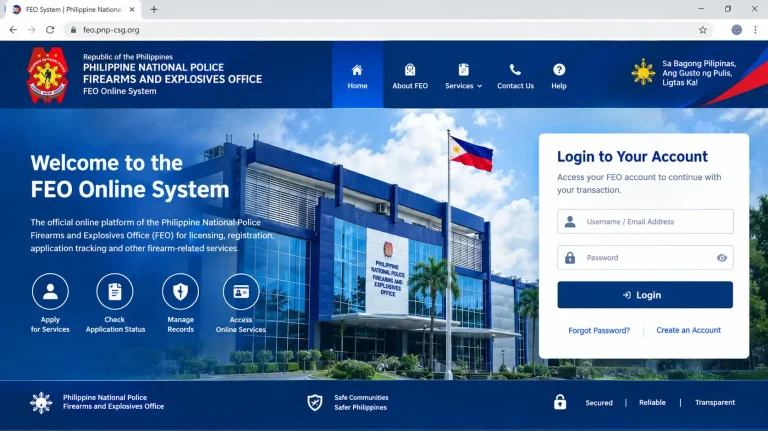
Accessing your account through the FEO new System Login Philippines portal requires the correct registered credentials and completion of any security checks provided by the system. Before starting, ensure that your account has been registered successfully and that you have access to the mobile number and password associated with your account.
This step-by-step guide explains how to access the FEO New System Philippines, enter your login details, complete security verification, and navigate the dashboard. The exact login fields and available services may vary depending on the current portal configuration.
Step 1: Visit the FEO New System Portal
Start by opening the verified FEO System portal using a supported web browser on your computer, tablet, or mobile device. Make sure your internet connection is stable so the login page can load properly.
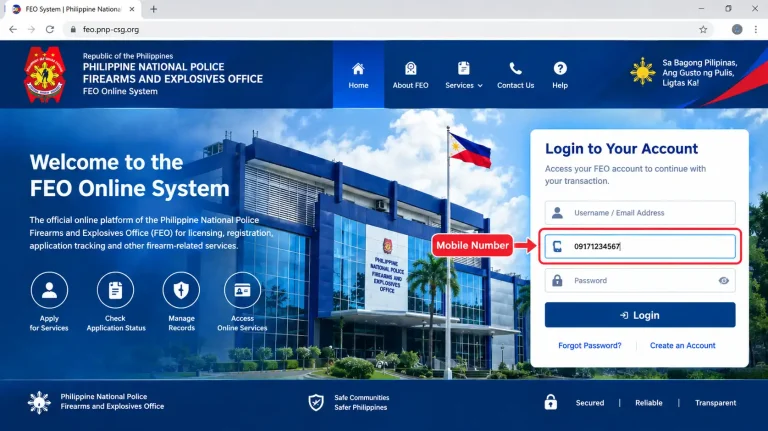
Step 2: Enter Your Registered Mobile Number
If the new FEO System Login page requests a mobile number, enter the number associated with your registered account. Correct information helps the system identify your account and process your login request.
Step 3: Enter Your Password
Next, provide the password associated with your pnp FEO System account. Enter it carefully because passwords are generally case-sensitive, meaning uppercase and lowercase letters may be treated differently.
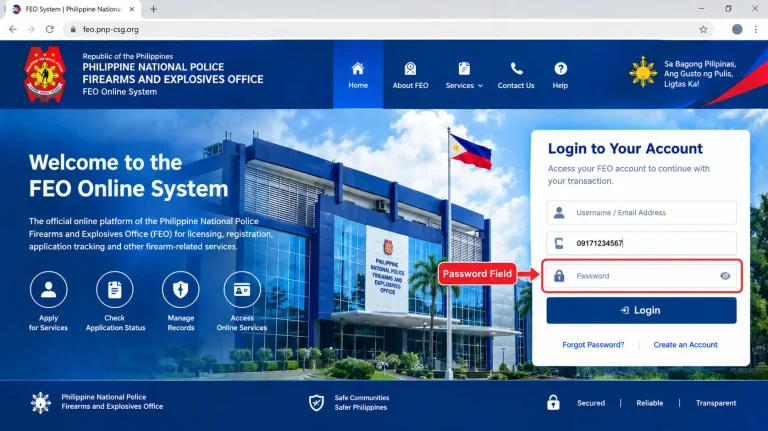
Never share your password with another person or enter it on an unverified login page.
Step 4: Complete the Security Verification
Depending on the portal’s current configuration, you may be asked to complete a CAPTCHA, verification challenge, or another security check before signing in.
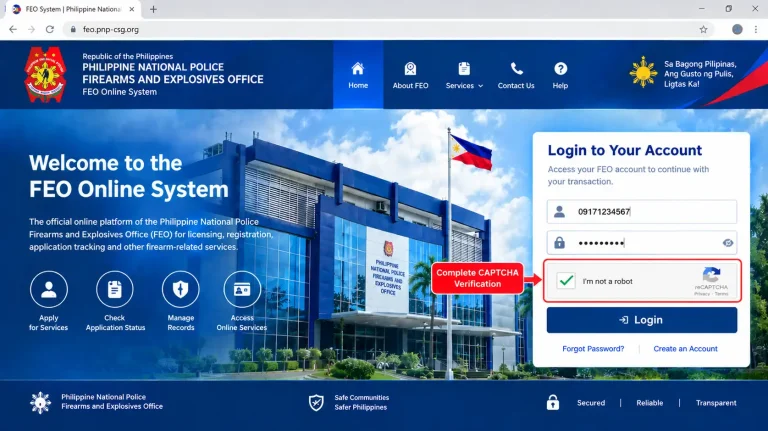
If the verification process fails, follow the on-screen instructions and try again without repeatedly submitting incorrect information.
Step 5: Sign In to Your FEO System Account
After entering the required information, submit your login request. The system will check your credentials and determine whether access can be granted.
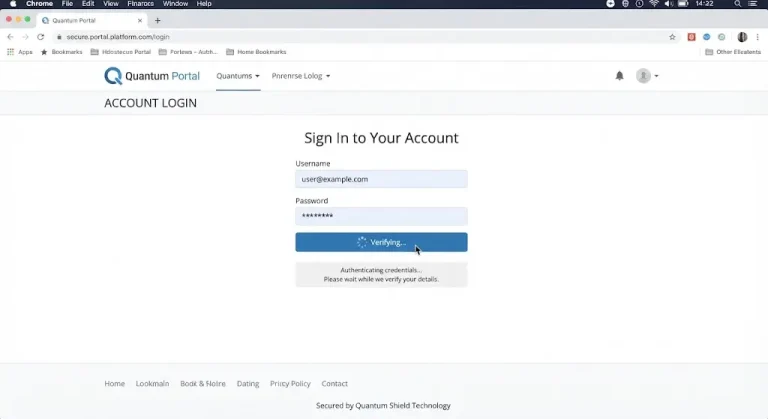
If you receive an error message, check your login details and confirm whether the portal is available before attempting another login.
Step 6: Access the Dashboard and Available Services
After successfully signing in, review the account dashboard and identify the services available to your registered account. The displayed options may depend on your account type, application status, and the portal’s current features.
The FEO System Philippines 2026–2027 login process may differ as the platform is updated. If a feature described in this guide is not displayed, consult the relevant official FEO instructions rather than assuming that the service is available to every user.
Understanding the License to Own and Possess Firearms (LTOPF)
The License to Own and Possess Firearms (LTOPF) is an essential component of firearm regulation in the Philippines. Administered under the applicable rules of the Philippine National Police (PNP) and its Firearms and Explosives Office (FEO), the LTOPF establishes the legal authorization required for eligible individuals to own and possess firearms, subject to Philippine law and relevant licensing conditions. Homepage
Within the scope of the pnp FEO System Philippines 2026–2027, understanding the ltopf feo system com login is important for applicants who want to learn about firearm licensing, eligibility requirements, application procedures, and the responsibilities associated with lawful firearm ownership. Individuals searching for LTOPF FEO System com login should also understand that accessing an online portal does not, by itself, grant permission to own or possess a firearm.
Importance of the LTOPF in the Philippines
The License to Own and Possess Firearms plays an important role in the country’s firearm regulatory framework.
LTOPF Categories and Firearm Ownership Limits
Under the FEO new System Philippines 2026–2027, understanding the different License to Own and Possess Firearms (LTOPF) classifications is important for applicants researching firearm licensing and ownership requirements. The applicable license category and the number of firearms a person may legally possess depend on current Philippine National Police (PNP) regulations and the conditions of the authorization granted.
The following table summarizes the LTOPF categories and firearm ownership limits commonly referenced in online guides. However, these figures should be verified against the latest official PNP-FEO regulations before an applicant relies on them for a licensing decision.
LTOPF Classification Table
| LTOPF Category | Maximum Number of Firearms |
|---|---|
| Type 1 | Up to 2 firearms |
| Type 2 | Up to 5 firearms |
| Type 3 | Up to 10 firearms |
| Type 4 | Up to 15 firearms |
| Type 5 | More than 15 firearms |
Important: The category limits shown above are provided for general informational purposes and have not been independently verified against the current official FEO classification rules. Applicants should confirm the applicable limits and eligibility conditions with the PNP-FEO before submitting an application.
Comparison of LTOPF Categories
The following comparison describes the general ownership-capacity distinctions presented in the table, rather than independently confirmed official category definitions.
| License Type | General Ownership Capacity |
|---|---|
| Type 1 | Lower firearm ownership capacity |
| Type 2 | Higher ownership capacity than Type 1 |
| Type 3 | Expanded ownership capacity |
| Type 4 | Larger ownership capacity |
| Type 5 | Ownership exceeding the listed lower categories, subject to applicable regulations |
How to Choose the Appropriate LTOPF Category
Before applying through the FEO New System Philippines, applicants should review the current licensing rules and determine which category, if applicable, corresponds to their circumstances.
Consider the following points:
Understanding the LTOPF categories helps readers navigate the new FEO System Philippines 2026–2027 guide and distinguish general licensing information from the specific legal requirements that apply to their applications.
Preparing Digital Documents for FEO Online Submission
Preparing clear, complete, and accurate digital documents can help applicants avoid common administrative problems when an online submission facility is available through the FEO New System Philippines.
Before uploading any documents, follow these general recommendations:
The available upload functions and submission requirements may change as the FEO System new is updated. Follow the instructions displayed for your specific transaction.
Common Document Upload Mistakes
Incomplete or inaccurate documentation can lead to additional verification requests and processing delays. Applicants should review their files carefully before submission.
Common mistakes include:
How to Avoid Document Submission Delays
Before finalizing an application through the FEO System Philippines, use a simple document review process:
- Compare your files against the official checklist for your transaction.
- Check the validity and completeness of each required certificate.
- Confirm that all personal information is consistent.
- Open each digital file to verify its readability.
- Review the portal’s submission instructions before uploading.
- Keep copies of submitted documents and any official transaction acknowledgments.
Applicants should verify the authorized assessment providers, required certificates, validity periods, and submission procedures through official PNP-FEO guidance. Not every assessment should be assumed mandatory for every transaction without checking the current rules.
Applicant Categories and Supporting Documents for FEO System
The documentary requirements for the new FEO System Philippines 2026–2027 may vary according to an applicant’s employment status, professional background, and the type of firearm licensing transaction being requested. In addition to identity documents and other general requirements, some applicants may need to provide supporting records to verify their occupation, business activities, or source of income.
Preparing relevant documents in advance can help applicants organize their applications and respond to requests for additional information. However, the documents listed below are general examples, not a confirmed checklist of mandatory requirements for every applicant. Always verify the current requirements with the Philippine National Police Firearms and Explosives Office (PNP-FEO).
Requirements for Licensed Professionals
Applicants working in regulated professions may be asked to provide documents confirming their professional credentials and employment or income information, where applicable.
Potentially relevant documents include:
Applicants should ensure that their professional identification and supporting records are valid and contain accurate personal information.
Requirements for Business Owners
Business owners, entrepreneurs, and corporate representatives may need to provide documents establishing their business registration or professional activities when these records are relevant to the application.
| Supporting Document | General Purpose |
|---|---|
| Securities and Exchange Commission (SEC) registration | Verifies the registration of a corporation or other applicable entity |
| Department of Trade and Industry (DTI) registration | Supports verification of a registered business name |
| Business permit | Provides evidence of applicable local business authorization |
| Income Tax Return (ITR) | Documents reported income when required |
| Other business records | Provides additional information requested by the processing office |
The documents required will depend on the applicant’s circumstances and the transaction being processed. Business registration records should be current where applicable, and applicants should not assume that submitting these documents automatically satisfies the FEO’s eligibility requirements.
Requirements for Private Sector Employees
Private sector employees may be asked to submit employment or income documentation if required under the applicable application procedure.
Examples of potentially relevant records include:
A Certificate of Employment should contain accurate employment details and, where appropriate, be issued on official company letterhead. Applicants should confirm which records are actually required before requesting documents from their employer.
Requirements for Overseas Filipino Workers (OFWs)
Overseas Filipino Workers may need to provide additional documentation when an application requires verification of overseas employment or related personal information.
Potential supporting records include:
OFWs should verify whether overseas-issued documents require authentication, translation, or another form of verification before submission. Requirements may differ depending on the document and the specific FEO transaction.
Requirements for Government Employees
Government employees may be asked to provide employment records when relevant to their application and the applicable verification process.
Examples include:
Applicants should ensure that their employment information is accurate and that any supporting documents meet the requirements of the relevant issuing agency and the PNP-FEO.
Requirements for Retired Individuals
Retired applicants may need to provide supporting records if the applicable procedure requires verification of retirement status, income, or other eligibility information.
Potentially relevant documents include:
Not every retired applicant will necessarily need all these documents. Applicants should confirm which records are relevant to their individual circumstances and avoid submitting unnecessary sensitive financial information.
Understanding Safety and Competency Requirements
Responsible firearm ownership in the Philippines involves more than submitting the correct documents. Applicants must also meet the applicable safety training, background verification, and fitness requirements established under current firearm regulations.
For individuals using the FEO new System Philippines 2026–2027 to learn about LTOPF applications and firearm licensing, understanding these requirements can help them prepare for the relevant procedures. The exact assessments, certificates, and eligibility conditions may vary depending on the application type and current Philippine National Police Firearms and Explosives Office (PNP-FEO) rules.
Gun Safety Seminar (GSS)
The Gun Safety Seminar (GSS) is associated with firearm safety education and responsible ownership. Where required, applicants must complete the appropriate training through an authorized or recognized provider and follow the applicable certification procedures.
Common subject areas in firearm safety education include:
Applicants should verify whether a Gun Safety Seminar certificate is required for their particular LTOPF application, which training providers are accepted, and whether any additional competency requirements apply.
National Police Clearance
A National Police Clearance may form part of the background verification process for applicable firearm licensing transactions. Applicants should confirm the current clearance requirements and ensure that their submitted information matches their official identification records.
Before submission:
Submitting accurate and consistent information can help reduce avoidable administrative delays. However, a police clearance alone does not establish eligibility for firearm ownership or guarantee approval.
Medical and Psychological Assessments
Depending on the applicable regulations and transaction, applicants may need to complete specified medical, psychological, or other fitness assessments.
| Assessment | General Purpose |
|---|---|
| Neuro-Psychiatric Assessment or Clearance | Supports the required evaluation of psychological fitness under applicable procedures |
| Drug Test or Clearance | Documents compliance with relevant drug-testing requirements, where applicable |
Important Information Regarding Air Guns
Under existing Philippine regulations, air guns may be subject to requirements that differ from those applicable to conventional firearms covered by a License to Own and Possess Firearms (LTOPF).
Important points to consider include:
As firearm regulations and licensing policies may change, applicants should consult the latest official PNP-FEO announcements and guidelines to ensure compliance with current requirements.
GIVE THE GUIDE IN THE TBLE
Available Online Services and Features of the FEO System
The FEO new System Philippines 2026–2027 supports online firearm licensing and registration processes, while the Philippine National Police Firearms and Explosives Office (PNP-FEO) also provides other regulatory services. The table below summarizes the main services and their purposes. Availability and application procedures may vary by transaction.
| Online Service or Feature | Description |
|---|---|
| LTOPF Application | Provides a process for eligible applicants to apply for a License to Own and Possess Firearms (LTOPF). |
| LTOPF Renewal | Supports the renewal process for eligible license holders, subject to current requirements. |
| Firearm Registration | Covers applicable firearm registration transactions and the evaluation of submitted requirements. |
| Firearm Registration Renewal | Supports relevant firearm registration renewal procedures. |
| Firearm Transfer | Covers applicable firearm transfer transactions in accordance with PNP-FEO rules. |
| Document Submission | Allows applicants to submit required documents online where supported by the application system. |
| Application Evaluation | Enables authorized FEO personnel to evaluate submitted applications and supporting documents. |
| Application Status Monitoring | Applicants can check available application updates through the relevant system or authorized office. |
| Payment Verification | Supports the validation of payment for applicable firearm transactions. |
| Air Gun and Airsoft Registration | The FEO lists air gun and airsoft registration among its services, subject to applicable regulations. |
| Permit to Transport Firearms | Provides procedures for applicable firearm transportation permits, depending on the applicant and purpose. |
| Gun Safety Seminar Certificate Validation | Supports validation of Gun Safety and Responsible Gun Ownership Seminar certificates. |
| Account and Security Features | Login and verification features may be available to help protect account access. |
Best Practices for Using the FEO New System
Whether you are a first-time applicant or an existing firearm owner managing records online, following recommended practices can help make the FEO New System Philippines easier to use and reduce common application errors.
Before Accessing the Portal
✔ Prepare all necessary supporting documents in advance.
✔ Confirm that certificates and clearances are valid.
✔ Use an active email address that you check regularly.
✔ Keep your registered mobile number updated.
✔ Create strong, secure login credentials.
During Online Transactions
✔ Review all entered information carefully before submitting.
✔ Upload clear, readable scans of the required documents.
✔ Keep copies of all submitted records.
✔ Check for application updates regularly.
✔ Follow only official instructions and announcements.
After Submission
✔ Save your transaction reference numbers for future reference.
✔ Check your email regularly for notifications.
✔ Track your application status through the FEO System portal, if the feature is available.
✔ Respond promptly to requests for additional documents or clarification.
Common FEO System Issues and Solutions
Like other government online platforms, the pnp FEO System Philippines may occasionally experience technical difficulties or application-related problems. Users can often resolve common issues by checking their account details, reviewing submitted documents, and ensuring that all required information is accurate and up to date.
| Issue | Possible Cause | Recommended Solution |
|---|---|---|
| Unable to log in to the FEO New System | Incorrect username or password | Verify your login credentials and use the password recovery option if available. |
| Verification email not received | Incorrect email address or email filtering | Check your Spam or Junk folder and confirm that your registered email address is correct. |
| Account verification pending | Incomplete registration process | Complete all required verification steps and wait for confirmation from the system. |
| Uploaded document rejected | Blurred, incomplete, or unreadable document | Upload a clear, complete, and readable copy that meets the portal’s requirements. |
| Application status not updating | Application is still under review | Check your account regularly and wait for official updates from the PNP-FEO. |
| Personal information mismatch | Inconsistent details across submitted documents | Review your records and ensure that names, dates, and identification details are accurate and consistent. |
| Expired clearance or certificate | Supporting document has passed its validity period | Obtain an updated document if required and follow the official resubmission instructions. |
| Unable to upload files | Unsupported file format or file-size limitations | Use an accepted file format and ensure that the file size meets the portal’s requirements. |
| Missing application records | Incorrect account access or incomplete submission | Confirm that you are using the correct account and check whether the application was successfully submitted. |
| Delayed application processing | High application volume or additional verification requirements | Monitor your account and respond promptly to requests for additional documents or clarification. |
Tips to Avoid FEO System Processing Delays
Applicants can improve their experience with the FEO New System Philippines by following these practical recommendations:
Following these recommendations can help minimize avoidable errors and make it easier to manage application records and resolve common issues when using the pnp FEO System Philippines 2026–2027.
Frequently Asked Questions (FAQs)
Conclusion
The FEO System Philippines 2026–2027 is an important topic for individuals seeking information about firearm licensing, registration, LTOPF requirements, and related regulatory services in the Philippines. Understanding the system, preparing the appropriate documents, and reviewing the applicable procedures can help applicants manage their transactions more effectively.
Whether you are researching an LTOPF application, firearm registration, license renewal, or FEO new System login, accurate information is essential. Check your documents carefully, keep your contact information current, and follow the latest official instructions issued by the PNP-FEO.